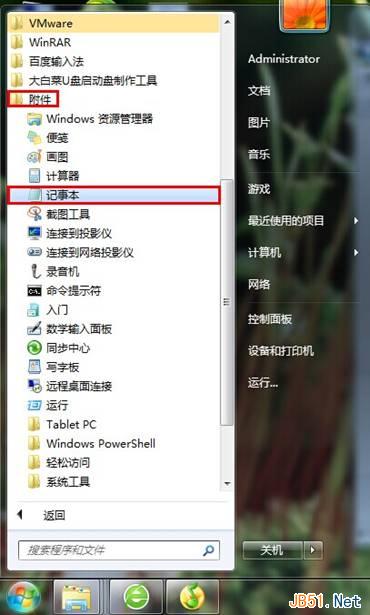
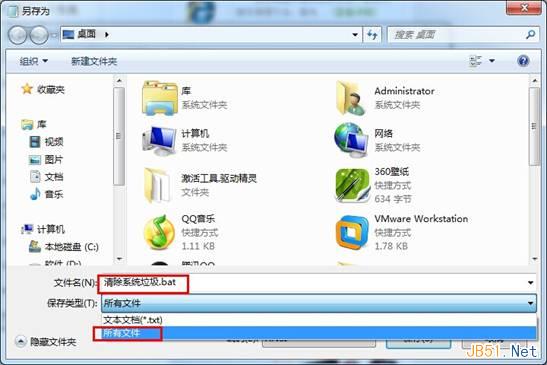
Windows 7 長期使用累積大量暫存檔、日誌、錯誤報告、縮圖快取、Windows Update 備份等垃圾檔案。自製 BAT 批次腳本一鍵清理常見垃圾路徑,定期執行保持系統輕量。
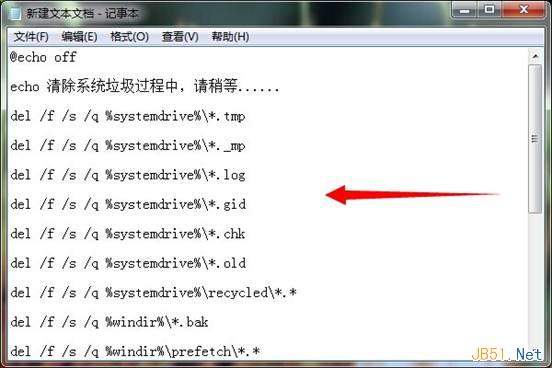
@echo off
echo 正在清理系統垃圾,請稍候......
del /f /s /q %systemdrive%\*.tmp
del /f /s /q %systemdrive%\*._mp
del /f /s /q %systemdrive%\*.log
del /f /s /q %systemdrive%\*.gid
del /f /s /q %systemdrive%\*.chk
del /f /s /q %systemdrive%\*.old
del /f /s /q %systemdrive%\recycled\*.*
del /f /s /q %windir%\*.bak
del /f /s /q %windir%\prefetch\*.*
rd /s /q %windir%\temp & md %windir%\temp
del /f /q %userprofile%\cookies\*.*
del /f /q %userprofile%\recent\*.*
del /f /s /q "%userprofile%\Local Settings\Temporary Internet Files\*.*"
del /f /s /q "%userprofile%\Local Settings\Temp\*.*"
del /f /s /q "%userprofile%\recent\*.*"
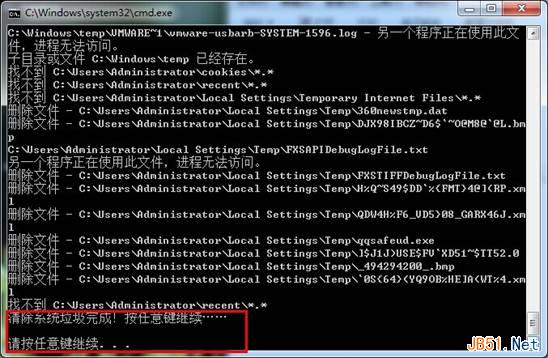
echo 清理完成!按任意鍵繼續...
pause
| 參數 | 含義 |
|---|---|
| /f | 強制刪除唯讀檔案 |
| /s | 遞迴子目錄 |
| /q | 安靜模式(不逐一確認) |
| rd /s /q | 刪除目錄樹包含內容,無提示 |
| md | 建立目錄(重建 temp 避免權限問題) |
:: Windows Update 清理 (需 Dism++ 或磁碟清理)
:: 瀏覽器快取 (Chrome/Firefox/Edge 路徑不同)
:: 縮圖快取: del /f /s /q /a:h %userprofile%\AppData\Local\Microsoft\Windows\Explorer\thumbcache_*.db
:: 記憶體傾印: del /f /q %systemroot%\MEMORY.DMP
:: 事件日誌: wevtutil cl System & wevtutil cl Application