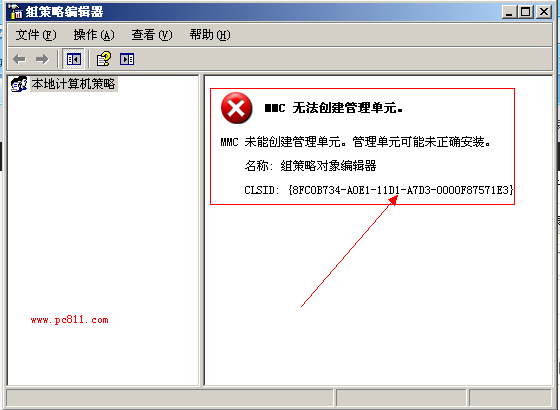
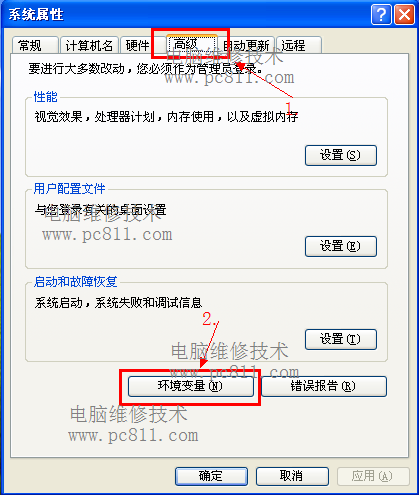
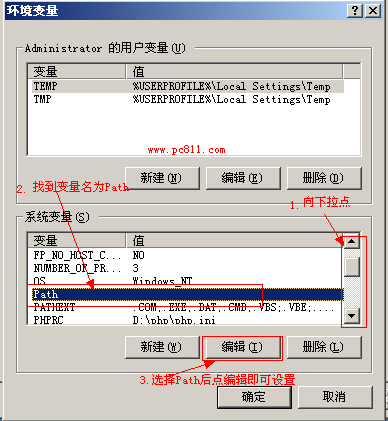
環境變數 Path 修改錯誤會導致 MMC 管理單元無法建立、services.msc、gpedit.msc 等系統工具無法開啟。恢復預設值即可修復。
Path
services.msc
gpedit.msc
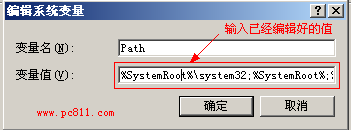
%SystemRoot%\system32;%SystemRoot%;%SystemRoot%\System32\Wbem
;C:\mysql5.5\bin
注意:不需輸入磁碟代號,%SystemRoot% 會自動解析為系統碟路徑。
%SystemRoot%
Win8 系統重置後記憶體不穩定?原因分析與解決方案
Win10 預覽版 (Build 9841/9860) 商店應用可直接拖曳建立桌面捷徑
升級 Windows 10 系統需滿足條件?官方硬體規格完整說明
Windows 系統用 CMD 指令安裝與移除服務,兩種方法詳解
酷炫技術:在 Windows 上安裝 OpenSSH 服務,透過 SSH 遠端管理
如何清除 Win10 帳號頭像歷史記錄並恢復預設灰色頭像
Windows 8.1 睡眠喚醒失效?硬體支援檢查、驅動更新、裝置喚醒權限三步徹底解決
Win7 64位關機按鈕不見了?群組原則一鍵找回