許多用戶升級 Win7 後發現 MSN (Windows Live Messenger) 托盤圖示消失,習慣點擊托盤快速開啟聊天視窗的使用者感到不便。以下提供雨林木風 Win7 環境下的兩步驟解決方案,讓 MSN 圖示重返任務列通知區域。
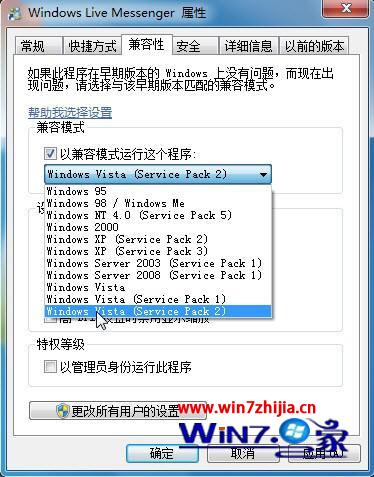
圖 1:設定 Vista SP2 相容模式
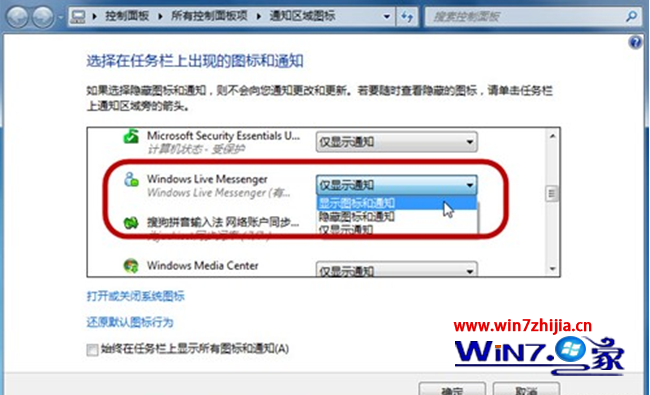
圖 2:將 MSN 設為顯示圖示和通知
原理說明:Win7 對舊版通訊軟體的托盤整合機制較嚴格,透過相容模式模擬 Vista 環境,搭配通知區域強制顯示設定,即可恢復托盤圖示。
Win10 右鍵選單樣式太大?修改登錄切換回傳統緊湊模式
Win7 關閉自動播放功能,插入 USB/手機不再彈出視窗
Win7 Excel 無法開啟怎麼辦?Office 內建修復功能完整操作教學
Win10 零售演示模式圖片與影片曝光:神秘「宋冬」帳戶現身
Windows 10 禁止強制自動更新:使用官方「Show or hide Updates」工具
Win10 和 Win7 哪個快?性能對比評測:遊戲持平、瀏覽器 Edge 完勝、磁碟小勝
Win10 Mobile Build 10151 曝光:解鎖與應用啟動動畫變革,類 iOS 全屏撲面效果
Win8.1 系統預設字型遺失?「還原預設字型設定」一鍵找回微軟正黑體