Windows XP Windows 7 Windows 2003 Windows Vista Windows 綜合教學 Linux 系統教學
Windows 10 Windows 8 Windows 2008 Windows NT Windows Server 電腦軟體教學
您现在的位置: Windows教程網 >> Windows教程 >  >> Windows 綜合教學 >> 關於 Windows

Windows 10 Build 9879 0xAB 藍屏解決方案:安裝 KB3019269 修正補丁

編輯:關於 Windows

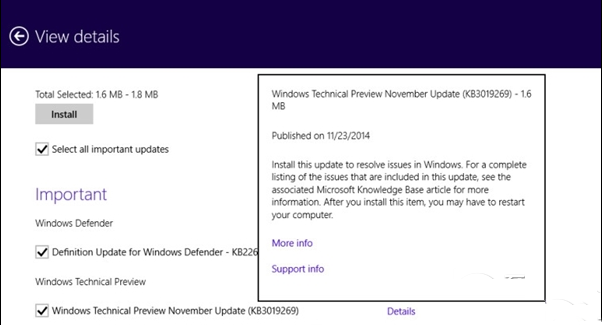
Windows 10 Technical Preview Build 9879 32/64 位元版本均出現高頻率 0xAB (SESSION_HAS_VALID_POOL_ON_EXIT) 藍屏死機。微軟已釋出專項修正補丁 KB3019269(< 2 MB),透過 Windows Update 推送給 Fast Ring 使用者,Slow Ring 將於驗證後跟進。
解決步驟

  1. 設定 → 更新與安全性 → Windows Update → 「檢查更新」。
  2. 尋找並安裝 KB3019269。
  3. 重新開機,觀察系統穩定性。

手動下載備援

若線上更新失敗,至 Microsoft Update Catalog 搜尋 KB3019269 下載對應架構 (x86/x64) 離線安裝包 (.msu),雙擊安裝。

現況說明

  • 此補丁為 Build 9879 專項修正,不適用於其他版本號。
  • 微軟持續收集遙測資料與使用者回饋,後續累積更新將整合更多穩定性修復。
  • 建議重要工作環境勿使用預覽版,改用 Windows 8.1 Update 3 或等待 Win10 正式版 (RTM)。
Copyright © Windows教程網 All Rights Reserved