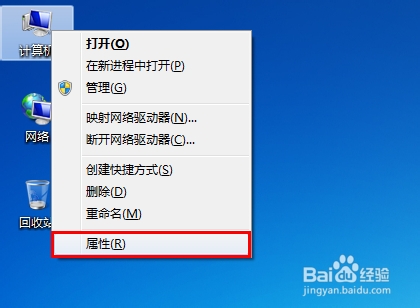
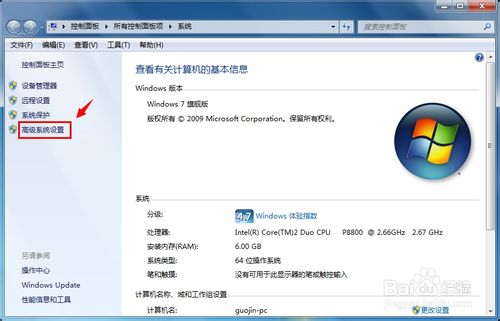
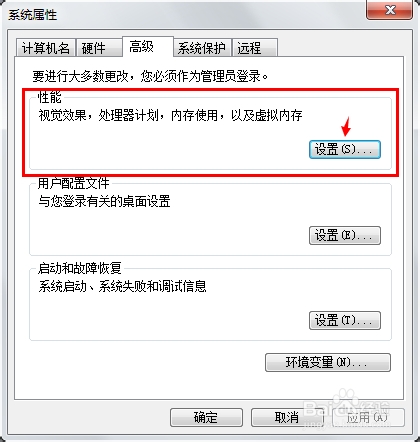
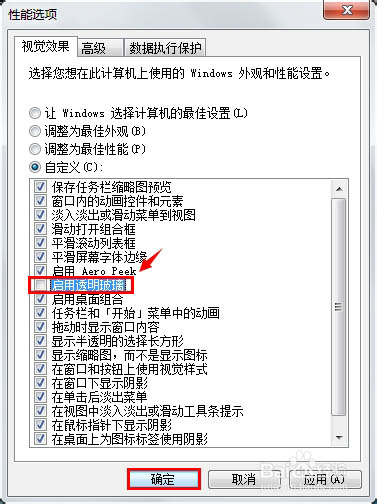
Windows 7 Aero 玻璃半透明效果雖美觀但佔用資源。若偏好純色視窗或需優化效能,可關閉透明效果:
若想恢復透明效果,同樣路徑勾選【啟用透明玻璃】即可。此設定不影響其他 Aero 效果 (如任務列預覽縮圖)。
Win10 Mobile 10080 更新內容總覽:全新應用商店、通用 Office、Xbox 應用亮相
Windows 10 新候選版本即將推出 預計下周與內測用戶見面
Win10 卸載記憶體驅動程式教學:裝置管理員操作步驟
Win7 安裝過程出現「載入驅動程式」提示的原因與解決方案
Win10 插入 U 盤連接正常但不顯示盤符?設置中刪除設備重新識別
錯誤 0x80070522「用戶端沒有所需的特權」:icacls 修復磁碟完整性層級
Windows 10 右鍵選單新增「管理員授權」選項:匯入登錄檔一鍵取得檔案/資料夾完全控制權限
Win10 Edge 瀏覽器如何安裝 LastPass 密碼管理擴充功能?應用商店搜尋安裝啟用三步走