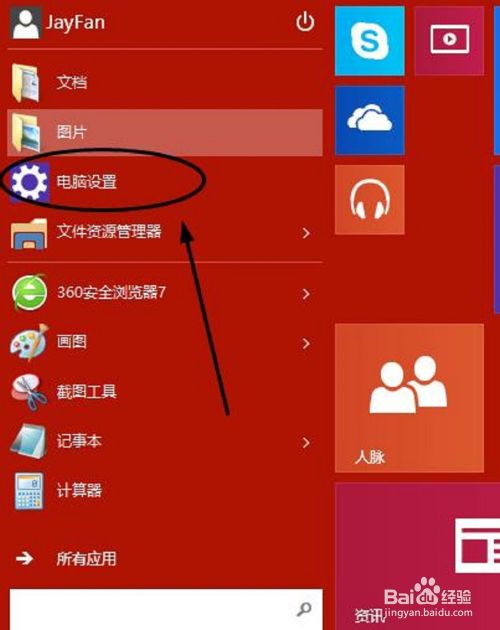
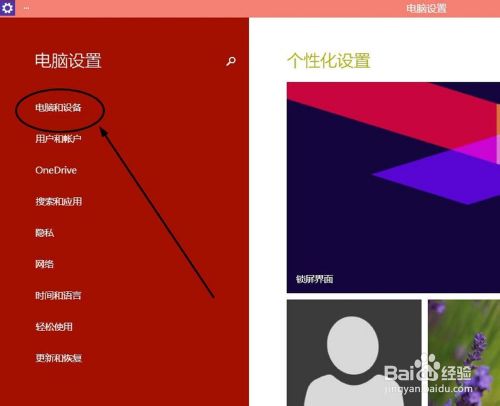
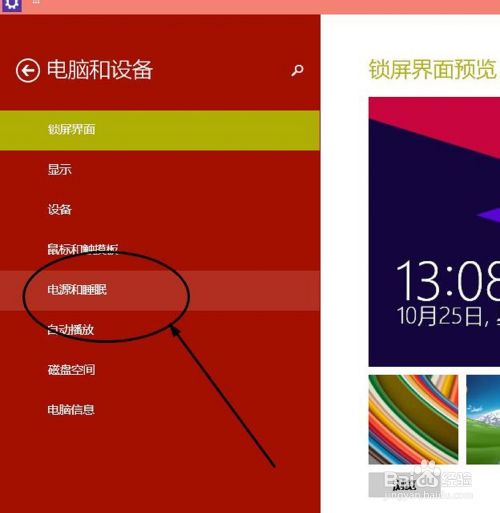
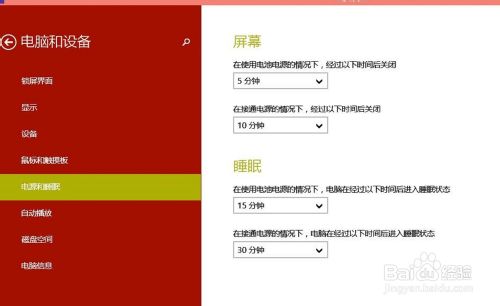
Win10 透過「設定」介面集中管理電源選項,路徑如下:
合理設定可延長筆電電池壽命、減少桌機待機功耗,建議依使用習慣調整。
Win7 系統檔案遺失導致驅動安裝失敗?完整解決教學
Win10 RS1 預覽版 14267 怎麼樣?上手操作體驗視頻
Win10 誤刪檔案並清空資源回收筒?登錄檔修復找回
Windows 8 滑鼠指標美化教學:安裝 Mac 風格指標套件
Win10 不想要驅動自動更新?微軟官方「顯示或隱藏更新」疑難排解工具 讓你掌控更新權
解決 Windows 8 開機自動彈出「程式庫」資料夾:登錄檔關閉自動執行
Win10 RS2 14942 上手影片:迷你開始選單、照片應用、新 Update 圖示示範
Win10 顯示「這台電腦」圖示至桌面:右鍵桌面→個人化→更改桌面圖示→勾選「電腦」確定