不小心刪除重要檔案並清空資源回收筒,若未覆寫資料,可透過修改登錄檔重建資源回收筒命名空間找回檔案。
regedit 開啟登錄編輯器。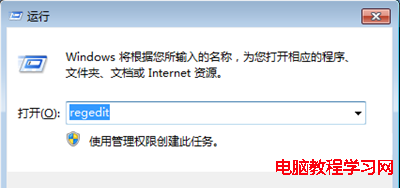
HKEY_LOCAL_MACHINE\SOFTWARE\Microsoft\Windows\CurrentVersion\Explorer\Desktop\NameSpace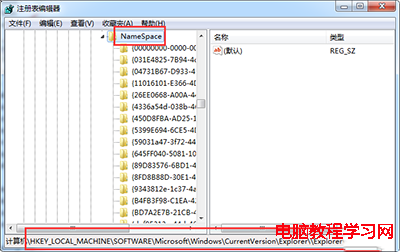
{645FF040-5081-101B-9F08-00AA002F954E}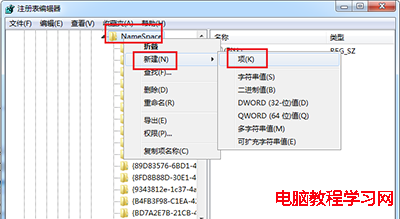
資源回收筒,確定。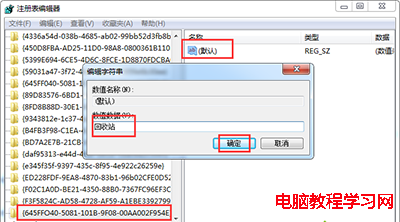
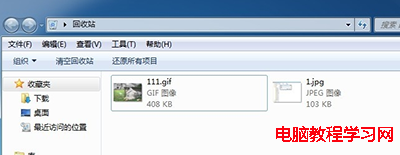
重要提醒:此法僅適用於資源回收筒被清空但檔案實體資料尚未被覆寫的情況。若已寫入新資料,請立即停止使用該磁碟,改用專業資料救援軟體(如 Recuva、R-Studio)掃描恢復。
Windows Server 2008 系統加固三大核心漏洞封堵實戰
Win7 內建磁碟管理免費無損調整分區大小:壓縮/擴展/新建完整圖文教學
盜版免費升級 Win10 每小時黑畫面一次?真相揭秘:微軟授權政策反覆橫跳
Win10 9901 任务栏透明效果彻底移除:Aero Glass 最后火种熄灭,用户呼声能否挽回?
Win10 桌面捷徑不見了?手動建立常用工具捷徑完整教學(數學輸入面板、繪圖、印象筆記、驅動精靈、截圖工具、滑動關機、一鍵結束程式、IE暫存資料夾)
Win8.1 附件程式 (計算機等) 如何建立桌面捷徑?觸控版開始畫面開啟檔案位置→傳送至桌面