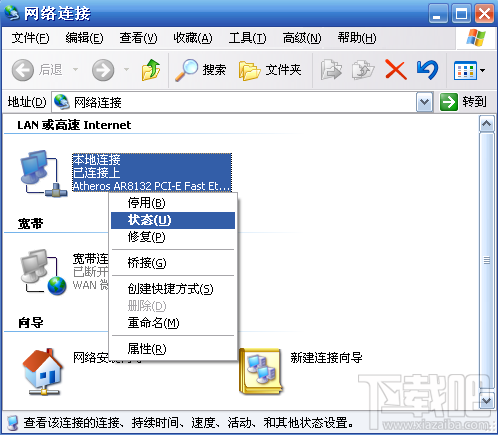
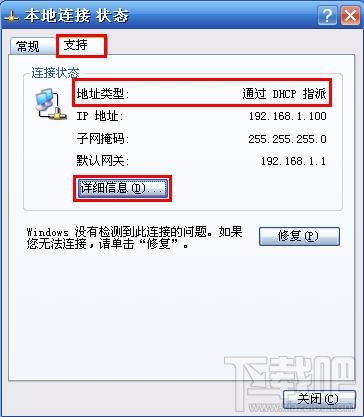
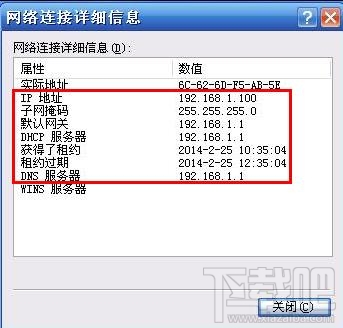
查詢 XP 本機 IP 位址、預設閘道、DNS 伺服器:
無線網卡同理,選「無線網路連線」即可。
Win7 滑鼠突然不動了怎麼辦?硬體檢查、驅動更新、高 CPU 佔用程序結束三大排查方向
Windows 7 64位元桌面「電腦」圖示不見?兩步驟找回系統圖示
正版 Win10 多少錢?官方零售版價格公布
Windows Server 2008 R2 RODC 部署規劃全攻略:唯讀網域控制器設計考量
下載 ISO 映像檔如何安裝 Windows 10?掛載 ISO 直接升級與製作 USB 開機隨身碟完整教學
Win10 Mobile 10149:相機、語音錄音機、計算機應用更新
Windows 10 開啟淘寶 HTTPS 顯示紅色斜線?系統時間錯誤導致憑證風險
Win10 控制台在哪裡?會被取代嗎?四種快速開啟方式與未來展望