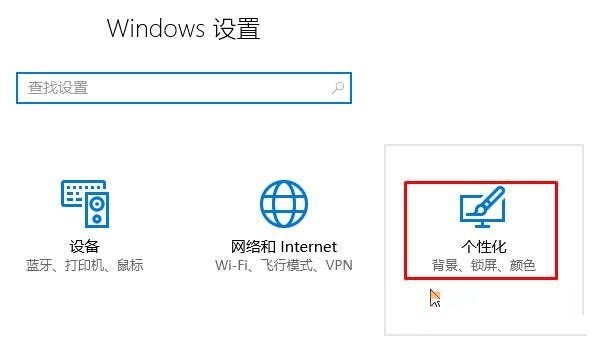
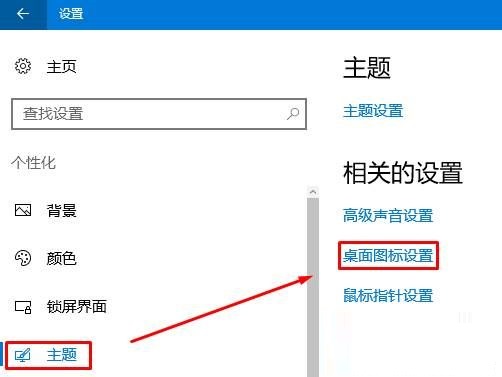
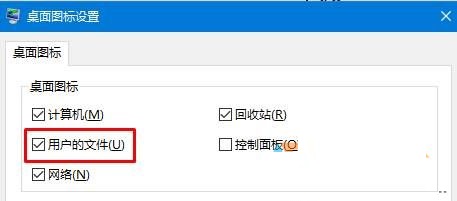
Win10 預設不顯示「我的文件」圖示。顯示方法:Win+I 開啟設定 → 個人化 → 主題 → 桌面圖示設定 → 勾選「使用者的檔案」 → 套用確定。桌面將出現以目前使用者帳號命名的資料夾圖示(非「我的文件」名稱),功能相同。
Windows 10 正式版你必須知道的 9 件事:免費升級、多裝置同步、Continuum、Edge、Cortana、虛擬桌面...
Win8 關閉 UEFI 引導模式安裝 Win7 圖文教程:BIOS 設定 CSM 啟用與 Legacy 啟動
Win10 關閉右下角通知中心/操作中心:登錄表法徹底禁用圖示與彈出
Win7 一鍵查詢系統啟用狀態:電腦屬性底部啟用資訊顯示
Windows 10 快速切換至桌面的四種實用技巧
Win7 硬碟改 AHCI 模式藍屏?安裝 AHCI 驅動再進 BIOS 修改
微軟改進 Win10 家庭功能:螢幕使用時間彈性管控、低齡兒童強制保護、跨裝置管理
Win10 Build 10051 更新詳解:全新郵件應用 UI 大改版