老舊 WinXP SP1 機器跑程式卡頓,兩大改善方案:
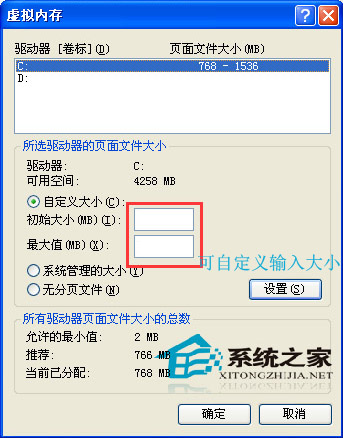
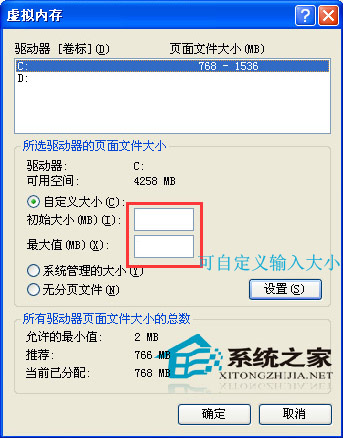
我的電腦 → 內容 → 進階 → 效能 → 設定 → 進階 → 虛擬記憶體 → 變更 → 自訂大小,初始值與最大值設相同 (如 1024 MB),存檔重開機。
記憶體條價格低廉,加裝 1-2 GB 實體記憶體可質變系統流暢度,虛擬記憶體壓力大幅降低。
短期急用用方案一,長期建議方案二,徹底解決卡頓。
Win10 10036 升級 10041 失敗怎麼辦?ISO 鏡像離線升級完整教學
Win10 無法安裝 GTX 1080 顯卡驅動?系統版本過舊缺乏硬體支援,升級系統即可解決
Win10 如何重置電腦?兩種模式完整教學 (保留/移除個人檔案)
Win10 正式版 Cortana 語音搜尋啟用全攻略:從登入到喚醒完整步驟
下載:DirectX 12 官方提取安裝包 Win7/8.1 也能裝
Win 10 系統如何查看圖片尺寸(大小)?五種方法圖文教學
Win7 連接 VPN 出現錯誤 800 怎麼辦?防火牆、連接埠、主機設定四步驟排查
Win8 系統卡死無回應?Ctrl+Alt+Del + 電源鍵啟動「緊急重新開機」避免強制斷電