Windows XP Windows 7 Windows 2003 Windows Vista Windows 綜合教學 Linux 系統教學
Windows 10 Windows 8 Windows 2008 Windows NT Windows Server 電腦軟體教學
您现在的位置: Windows教程網 >> Windows教程 >  >> Windows 綜合教學 >> 關於 Windows

Windows 8 解除 Modern 應用程式網路隔離限制(CheckNetIsolation 指令)

編輯:關於 Windows

企業環境下 Modern 應用程式(Metro Apps)預設受網路隔離限制,無法使用手動設定的 Proxy 伺服器上網。可使用內建 CheckNetIsolation.exe 工具將特定應用加入網路隔離豁免清單。

操作步驟

  1. 以系統管理員身分開啟「命令提示字元」。
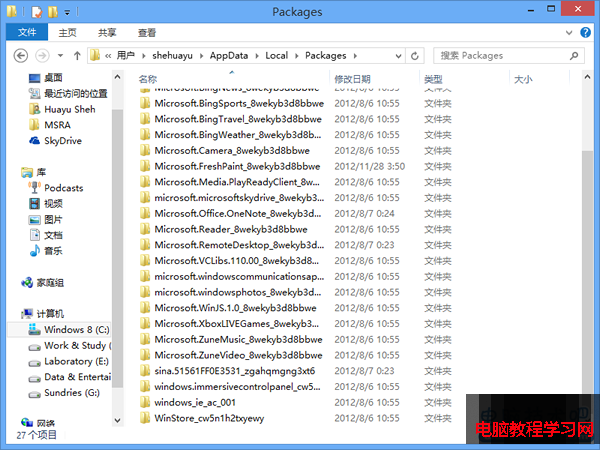
  2. 查看應用程式套件名稱:開啟 %LocalAppData%\Packages,資料夾名稱即為套件名稱(如 WinStore_cw5n1h2txyewy 為應用商店)。
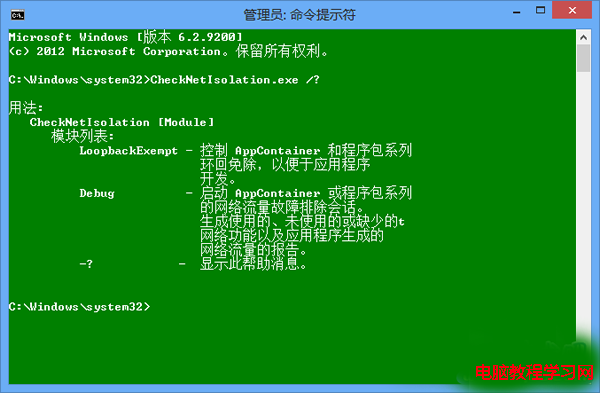
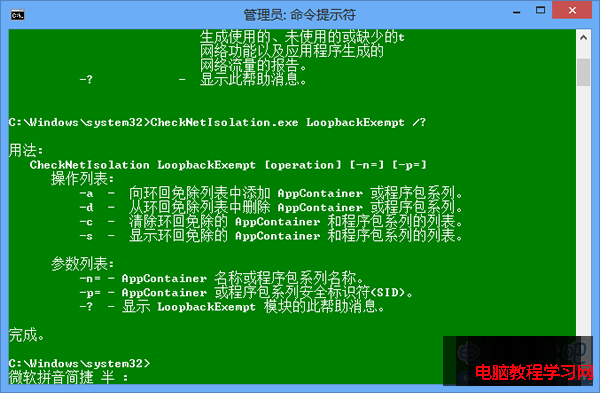
  3. 執行指令加入豁免:
    CheckNetIsolation.exe LoopbackExempt -a -n=套件名稱
    例:CheckNetIsolation.exe LoopbackExempt -a -n=WinStore_cw5n1h2txyewy
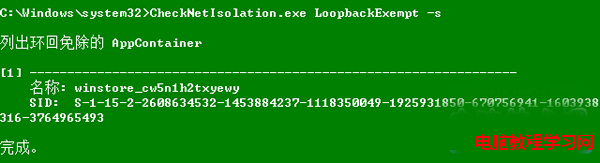
  4. 驗證豁免清單:
    CheckNetIsolation.exe LoopbackExempt -s

加入豁免後,該 Modern 應用即可繞過網路隔離直接使用系統 Proxy 設定連線外網。適用於企業 Proxy 環境、VPN 分流等場景。

Copyright © Windows教程網 All Rights Reserved