Windows XP Windows 7 Windows 2003 Windows Vista Windows 綜合教學 Linux 系統教學
Windows 10 Windows 8 Windows 2008 Windows NT Windows Server 電腦軟體教學
您现在的位置: Windows教程網 >> Windows教程 >  >> Windows 綜合教學 >> 關於 Windows

Win10 9926 語音喚醒 Cortana (小娜) 完整設定:區域/語言改為美式英文 + 開啟 Hey Cortana

編輯:關於 Windows

Build 9926 語音喚醒僅支援英文,設定步驟:

  1. 「設定」→「時間與語言」→「地區與語言」→ 國家選「美國」,新增語言「English (United States)」。
  2. 「設定」→「系統」→「語音」→ 講話語言選「English (United States)」。
  3. 點擊工作列 Cortana 搜尋框 → 左上角選單 → 開啟「Cortana 功能」與「Hey Cortana」開關 (需麥克風)。
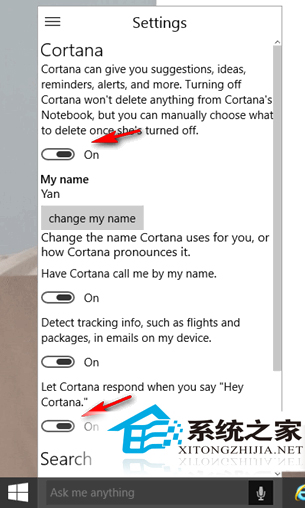
喚醒語句:「Hey Cortana」,緊接說出指令 (如「Hey Cortana, 今天天氣如何?」) 無需等待回應。目前無中文語音支援,中文版小娜預計數月後推出。

Copyright © Windows教程網 All Rights Reserved