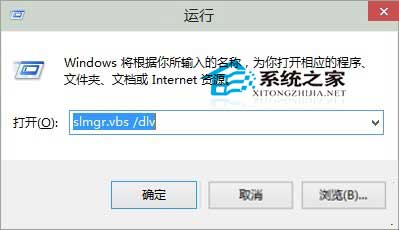
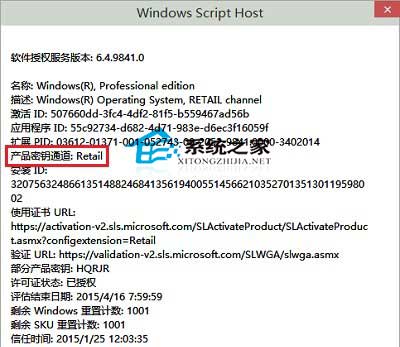
想知道目前安裝的 Win10 為零售版、大量授權版或 OEM 版?無需安裝額外軟體,內建指令即可查詢:
slmgr.vbs /dlv
Retail
Volume
OEM
若需更換金鑰,請參考《Win10 系統更換金鑰的方法》。
Win10 Build 10114 開始功能表 UI 大幅調整:左下角回歸、底部列設計、Insider Hub 改版
Win10 RedStone 重大更新 vs TH2:三大核心改進深度解析
Win7 瀏覽器提示「網站無法顯示該網頁」?IE 設定與 IIS 除錯兩大方向
Win8 系統藍屏錯誤代碼 0x0000009F:成因與完整解決方案
微軟官方 Win 10 正式版發布專題部落格上線
解決 Windows 7 正版序號驗證錯誤 0xC004F061:升級序號無法全新安裝
Win7 螢幕截圖四大法:PrintScreen 全螢幕、Alt+PrintScreen 視窗、截圖工具、Ctrl+PrintScreen
Win8 系統顏色設定錯誤導致顯示異常?恢復系統預設色彩校正修復