為防止他人隨意更改螢幕解析度、主題等設定,管理員常需禁用控制台中的「顯示」小程式。本文提供兩種可靠做法:
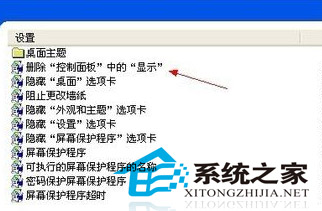
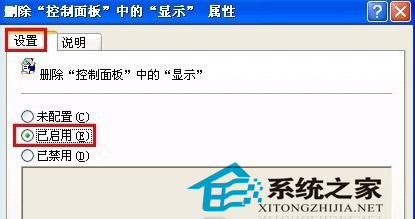
gpedit.msc 開啟群組原則。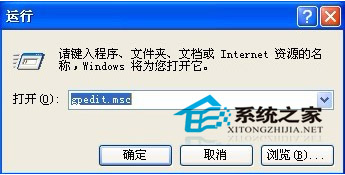
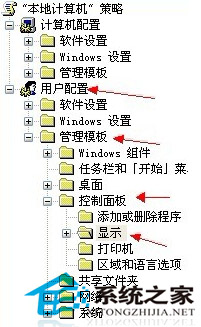
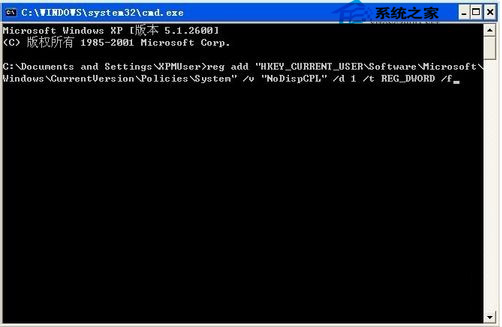
cmd 開啟命令提示字元。reg add "HKEY_CURRENT_USER\Software\Microsoft\Windows\CurrentVersion\Policies\System" /v "NoDispCPL" /d 1 /t REG_DWORD /fexplorer.exe 使生效:cmd /k taskkill /f /im explorer.exe & explorer.exe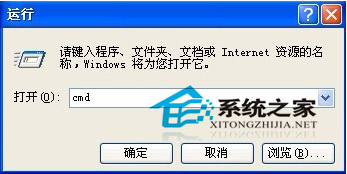
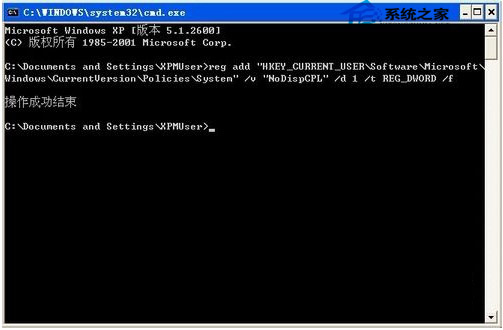
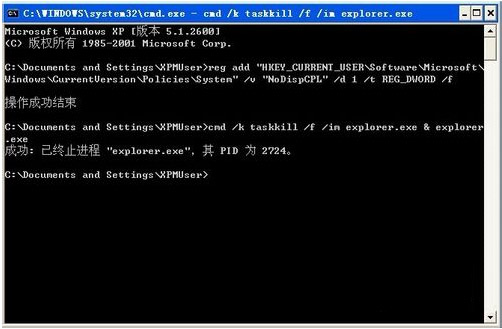
建議新手優先使用方法一,操作介面直觀且不易出錯;方法二雖快但需熟悉登錄操作。
Win10 首次提供免費升級!七大新變革一覽:多平台同步、Cortana、Spartan、Xbox 整合
Win10 Build 9861 更新內容:新增韓語/阿拉伯語,Cortana 桌面版開發加速,預覽版首次升級在即
Win10 家庭版禁止關機自動更新:官方 wushowhide 工具隱藏更新完整教學
Windows 10 Cortana 顯示手機未接來電並支援電腦端回覆簡訊:完整設定教學
Windows 修改日期顯示格式並顯示星期:自訂短日期格式 yyyy-M-d dddd
Windows Hello 發布:Win10 支援臉部、指紋、虹膜生物辨識免密碼登入
Win7 64位 旗艦版執行遊戲提示遺失 msvcp120.dll?下載 DLL 檔放入 SysWOW64 並註冊、安裝 VC++ 2013 解決