NVIDIA 顯卡控制面板啟動項 nvcpl.exe(NVIDIA Control Panel)會在開機時自動載入,雖提供快捷右鍵選單存取,但對開機速度有可測量影響。若不常調整 3D 設定,可透過服務管理禁用此項,僅限 Win7 64 位系統有效(32 位系統無此服務項目)。
操作步驟
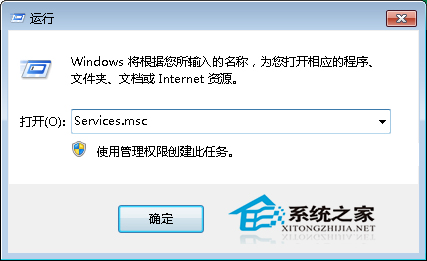
- Win+R 輸入
services.msc 開啟服務管理單元。
- 在右側清單找到 nvcpl.exe(或顯示為「NVIDIA Control Panel」/「NVIDIA Display Container Local System」等相關名稱),雙擊開啟屬性。
- 將「啟動類型」改為 「停用」,點擊「確定」。
- 重新開機驗證開機速度提升。
效果與代價
- 收益: 開機進入桌面時間通常縮短 2-5 秒(視硬體而定),減少背景程式資源佔用。
- 代價: 桌面右鍵選單不再出現「NVIDIA 控制面板」選項;需手動執行
C:\Windows\System32\nvcpl.dll 或從開始選單啟動控制面板才能存取 3D 設定。
- 適用性: 僅針對 Win7 64 位 + NVIDIA 獨顯 環境;Intel 核顯、AMD 顯卡、Win7 32 位、Win8/10/11 均不適用或路徑不同。
替代方案: 若需保留右鍵選單但仍想加速,可使用「工作管理員」→「啟動」索引標籤禁用 NVIDIA Control Panel 啟動項,效果相近且可隨時恢復。