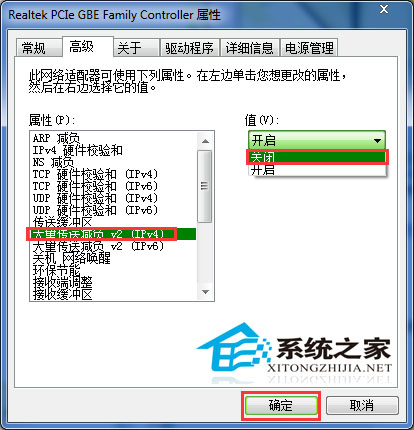
Win7 在區域網路存取共用檔案異常緩慢,實測有效解法有二:
套用上述設定重開機後,共用檔案存取速度明顯提升,雙擊進入資料夾不再卡頓。
Windows 8 搜尋不到 Wi-Fi 訊號?檢查 WLAN AutoConfig 服務啟動狀態
升級 Win 10 十大理由之十:Windows 10 應用商店(含影片)
善用 Win7 手寫輸入面板:不會打字也能輕鬆輸入文字
Windows 10 鬧鐘與時鐘應用程式批次刪除鬧鐘
Win8.1 資源管理器無法開啟、提示找不到腳本檔案?完整修復教學
Win8/8.1 更改電源計畫設定完整教學:基本與進階選項
Win8 新增索引位置加速搜尋:控制台索引選項自訂範圍
Win10 定時關機三大方法:關機指令、下載工具排程、第三方小工具