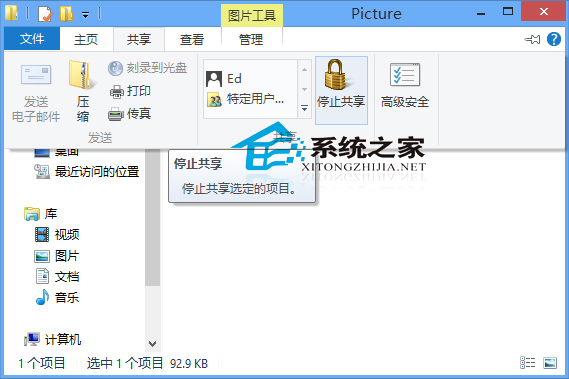
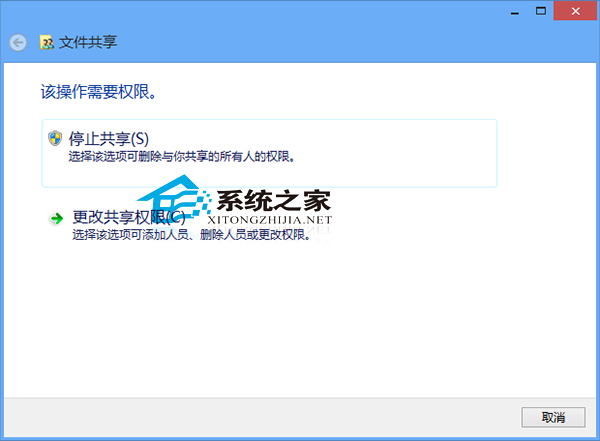
Windows 8 停止資料夾共用極為簡單,透過檔案總管「共用」索引標籤即可完成。
延伸閱讀:Win8.1 共用檔案完整方案請參考《Win8.1 系統下共用檔案的完美方案》教學。
Win10 多重桌面 (虛擬桌面) 新增/切換/刪除操作指南
Win10 如何將預設瀏覽器從 Edge 改為 IE?雙重設定法圖解
WinXP 設定自動休眠省電,筆電續航力加倍
Win7 移除多餘輸入法優化系統:刪除繁體/日文/韓文 IME 釋放 85MB 空間
Win8 系統 C 槽出現 regid.1991-06.com.microsoft 資料夾能刪除嗎?官方建議:勿動!
Win10 應用商店提示「裝置數量達上限」怎麼解?微軟帳號裝置管理移除舊裝置教學
微軟:Win10 每年將推 2-3 次功能更新,服務性更新更頻繁
在 Windows 8 電源選單中新增「睡眠」選項