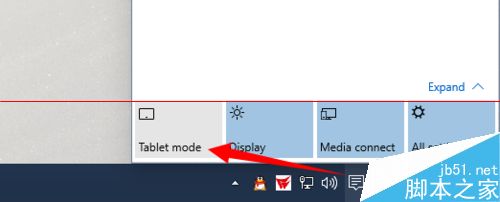
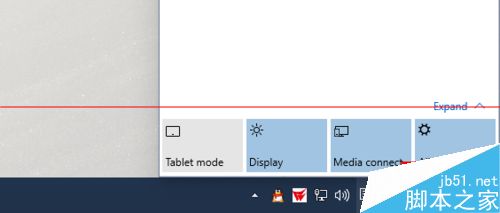
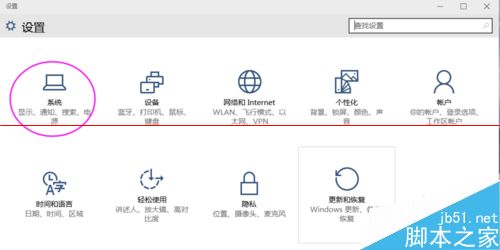
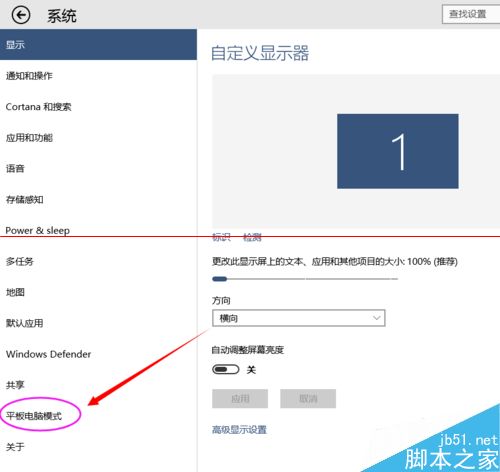
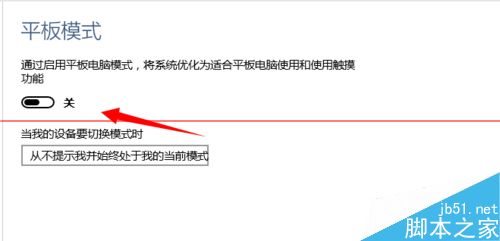
筆電具備觸控螢幕可使用平板模式,提升體驗。兩種開啟方式:
Win10 開始選單如何改回 Win7 經典樣式?Start10 與 Classic Shell 兩款神器推薦
Win10 找回 Win7 三大經典功能:Aero Glass、桌面小工具、經典計算機
Windows 8 網路連線錯誤代碼 118 解決教學:刷新 DNS、重設 TCP/IP 四步驟
Oracle 學習建議:興趣驅動、從 SQL 入門、掌握架構與備份恢復、進階調優與 RAC/Data Guard
Windows 7 將磁碟分區釘選至工作列:建立 .exe 捷徑實現一鍵開啟
Win7 開始選單顯示「最近使用項目」提升開啟應用程式效率
Windows 10 取消跨裝置同步開始選單與應用:減少磁碟浪費、提高彈性
Win7 插入 USB 隨身碟電腦頓卡?services.exe 佔用資源過高解決方案