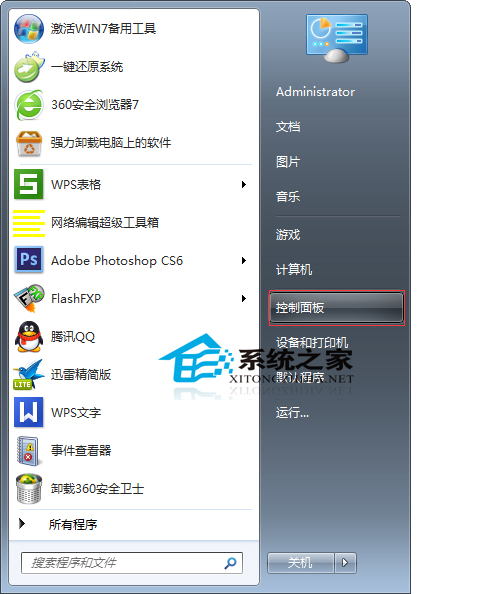
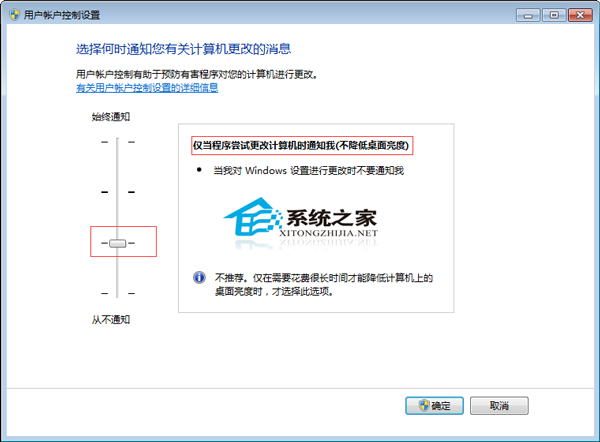
Win7 UAC 彈出預設會讓螢幕變暗 (安全桌面),看影片時干擾大。解法:控制台 → 使用者帳戶 → 更改使用者帳戶控制設定 → 滑桿拉至第三級:「僅當程式嘗試變更電腦時通知我 (不降低桌面亮度)」→ 確定。
設定後 UAC 彈出不再變暗,安全性略降但使用體驗大增。建議搭配標準使用者帳號日常操作,平衡安全與便利。
Windows 8/8.1 取消開機密碼:netplwiz 三步走,輕鬆自動登入
Win10 地圖 App 找不到中國離線地圖?修改登錄檔 ChinaVariant 值即可顯示
如何安裝 Windows 8 系統:圖文安裝教學完整流程
Win7 開機加速全攻略:啟用多核心啟動、精簡啟動項、服務優化三步驟
U大師 U 盤啟動盤製作工具 V4.3 完整圖文教學:從安裝到進入 PE
WP8 手機只有 4GB 儲存空間能升級 Win10 Mobile(需 5GB)嗎?需外接 microSD 卡方可升級
Win10 安裝 VirtualBox 虛擬機完整圖文教學(Oracle 官方版)
Win8 連接無線 WiFi 圖文教程:六步輕鬆上網