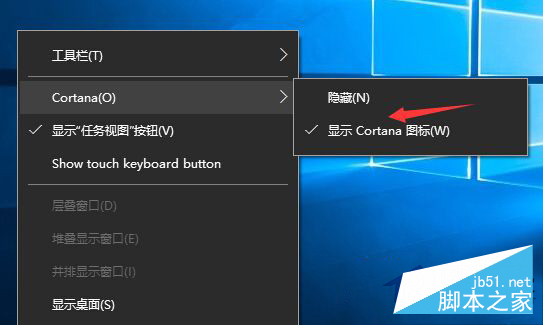
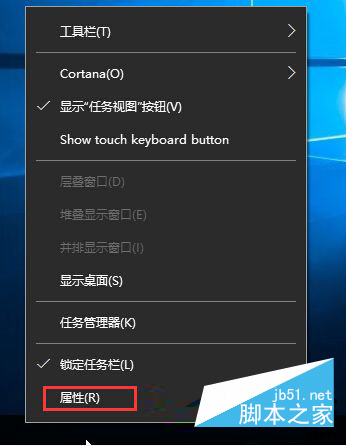
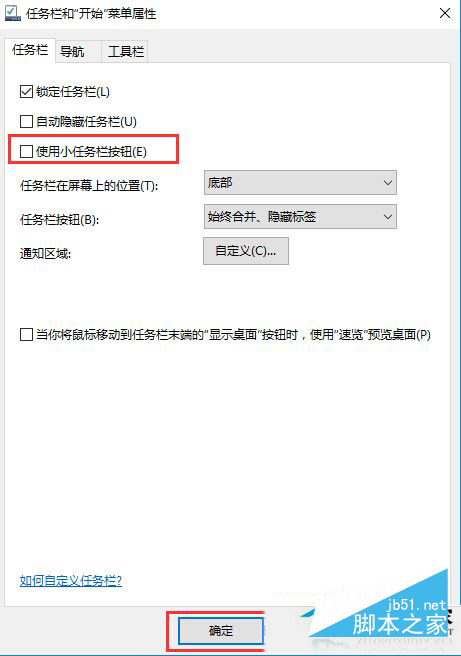
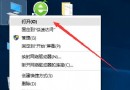
右鍵任務列的 Cortana 選單中若缺少「顯示搜尋框」選項,通常是因為啟用了「小任務列按鈕」模式。本文教您三步找回搜尋框。
小圖標模式下任務列高度縮減,無法容納完整搜尋框,因此系統自動隱藏該選項。
設定完成後,右鍵任務列 → Cortana 選單中「顯示搜尋框」選項將重新出現,勾選即可在任務列常駐搜尋列。
若仍偏好小圖標模式,可改用 Win + S 呼叫搜尋面板,功能相同且不佔任務列空間。
Windows 10 Build 10130 更新內容完整解析:介面與功能全面升級
Windows 9 通知中心曝光:類 Android/iOS 設計、支援分類、一鍵清除、下拉展開
Win8 用「魔方美化大師」或登錄檔在桌面建立 IE 圖示
Win10 啟用與關閉內建 Administrator 管理員帳號完整教學
Win10 筆電連接小米藍牙音箱/Link 線雙模教學:藍牙配對與 3.5mm 有線直連
Windows 10 安裝《英雄聯盟》提示「檔案或目錄損壞無法讀取」的 7-Zip + TGP 繞過安裝法
Windows 系統 C 槽資料夾功能詳解:哪些能刪、哪些不能動?
Win10 介面語言改為中文:控制台 > 語言 > 進階設定 > 覆寫顯示語言 > 登出生效