Windows XP Windows 7 Windows 2003 Windows Vista Windows 綜合教學 Linux 系統教學
Windows 10 Windows 8 Windows 2008 Windows NT Windows Server 電腦軟體教學
您现在的位置: Windows教程網 >> Windows教程 >  >> Windows 綜合教學 >> 關於 Windows

Win10 登入畫面啟用教學:開啟增強版登入介面

編輯:關於 Windows

Win10 正式版雖未釋出,官方已推出多個預覽版供使用者體驗。預覽版預設未啟用登入畫面,本文分享 Win10 登入畫面啟用方法,教您開啟增強版登入介面。
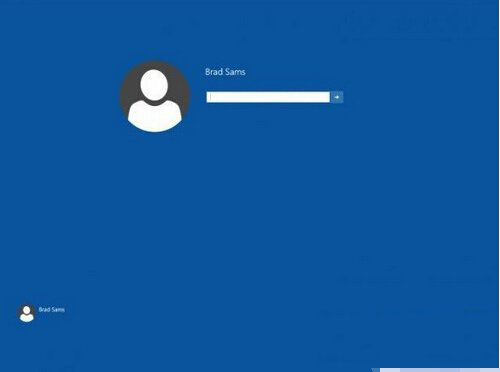
提醒:建議使用版本號 9926 的 Windows 10 進行操作,以啟用增強版登入畫面。

Win10 登入畫面啟用步驟

  1. 開啟 Regedit.exe(登錄編輯器)。
  2. 瀏覽至路徑:HKEY_LOCAL_MACHINE\SOFTWARE\Microsoft\Windows\CurrentVersion\Authentication\LogonUI\TestHooks
  3. 雙擊 Threshold 鍵值,在彈出對話框中將數值資料修改為 1。
  4. 關閉登錄編輯器,重新啟動電腦即可看到增強版登入畫面。

以上為 Win10 登入畫面啟用完整教學,更多內容請持續關注本站。

Copyright © Windows教程網 All Rights Reserved