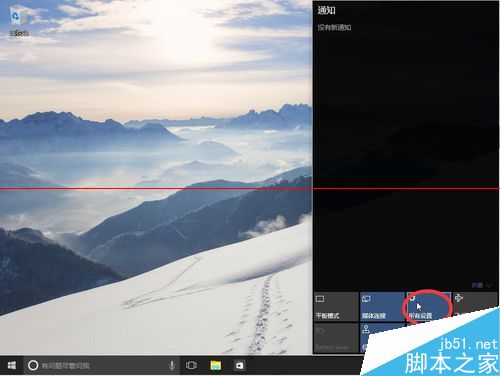
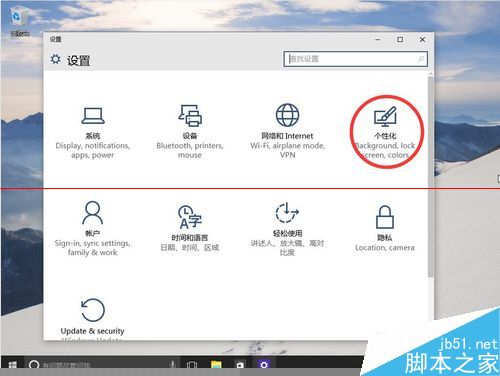
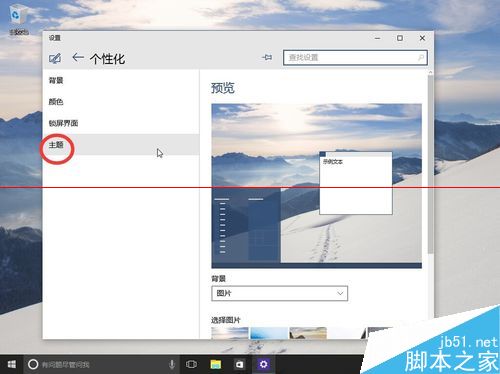
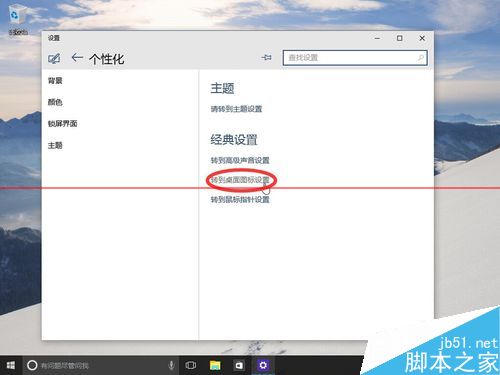
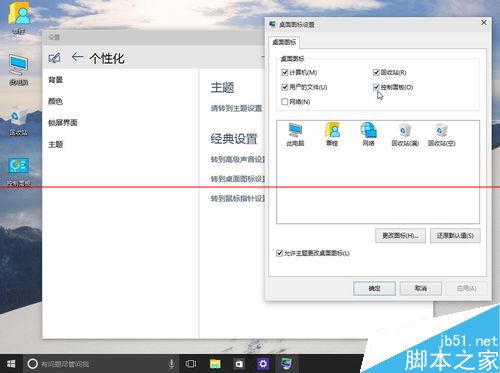
Windows 10 Build 10074 將桌面圖示設定入口移至「設定」應用,路徑與 Windows 7/8 大異。以下為詳細操作步驟:
注意: Build 10074 介面架構調整較大,許多設定入口位置與舊版不同,請依新路徑操作。
Win10 內部人員計畫(Insider)會員版本是什麼?如何加入獲取預覽版
Windows 8.1 系統重裝完整教程:善用內建恢復功能輕鬆還原
Windows XP 設定 DNS 伺服器圖文教學:以 114DNS 為例
Win10 無線網卡 Wi-Fi 間歇性高延遲解決方案:關閉定位服務停用背景熱點掃描
Win10 (10061) 版本內部會員成就如何獲得?圖文教學
Win8 應用商店/現代應用閃退?重建使用者設定檔 + 修改登錄表 ProfileImagePath 徹底修復
Win10 將「資源回收筒」釘選到快速存取:兩步驟間接實現側邊欄固定
詳解:一張桌面看懂 Win10 11 大新特性——開始功能表、動態磚、Cortana、任務視圖、Edge 等