Win10 新版「個人化」不如傳統直覺,且傳統介面仍保留。透過匯入註冊表於桌面右鍵加入「個人化設定」子選單,快速存取:
註冊表代碼(儲存為 .reg 執行):
Windows Registry Editor Version 5.00
[HKEY_CLASSES_ROOT\DesktopBackground\Shell\Appearance]
"MUIVerb"="個性化設定"
"SubCommands"="Wallpaper;Colors;Sounds;Screensaver;Icons"
"icon"="desk.cpl"
"Position"="Bottom"
...(完整子命令定義見原文)...
移除方式:匯入對應刪除鍵值的 .reg 檔。已打包下載連結供直接使用。
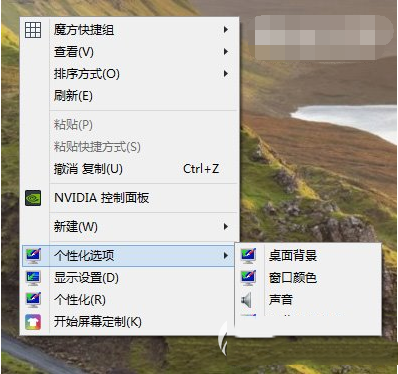
一鍵恢復傳統個人化操作習慣。