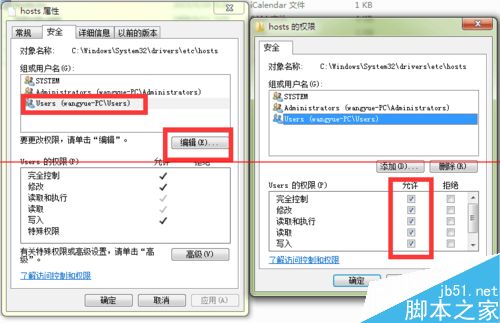
hosts 文件默認只讀,需修改權限才能用記事本編輯保存:
C:\Windows\System32\drivers\etc\
Win10 家用版內建第三方遊戲與精品應用:透過商店安裝
Windows 8 設定定時關機:shutdown 指令一行搞定
徹底關閉 Windows 10 自動更新:服務停用 + 復原機制雙重封鎖
Windows Server 2003 關機/重啟指令 shutdown 完整參數與定時任務教學
Win10清空回收站后如何恢复文件?注册表重建回收站命名空间找回数据
Win7 64 位元無法識別網路印表機?四大原因與解決教學
Win10 如何建立系統修復 USB 隨身碟?官方媒體建立工具完整教學
Win10 週年更新最新預覽版 14393.50 曝光:7/29 編譯完成,正式版候選版本浮現