Windows XP Windows 7 Windows 2003 Windows Vista Windows 綜合教學 Linux 系統教學
Windows 10 Windows 8 Windows 2008 Windows NT Windows Server 電腦軟體教學
您现在的位置: Windows教程網 >> Windows教程 >  >> Windows 綜合教學 >> 關於 Windows

Windows 7 開啟 Word 提示巨集錯誤?修復 Office 共用功能中的 VBA 元件解決

編輯:關於 Windows

Word 啟動時彈出巨集錯誤,主因 Office 安裝缺少 VBA (Visual Basic for Applications) 相關元件。透過修復安裝補齊即可解決。

修復步驟

  1. 控制台 → 程式與功能。
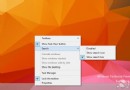
  2. 右鍵 Microsoft Office → 「變更」。
  3. 選擇「新增或移除功能」 → 繼續。
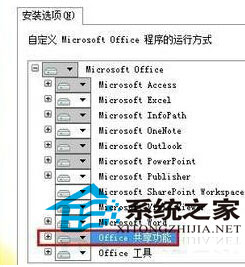
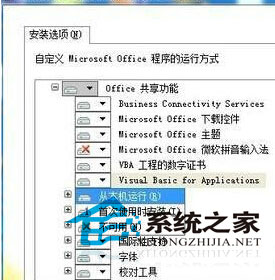
  4. 展開「Office 共用功能」→ 勾選:「VBA 專案數位憑證」與「Visual Basic for Applications」→ 設為「從我的電腦執行」。
  5. 繼續安裝至完成 → 重新啟動 Word 驗證。
控制台程式與功能 Office 修復安裝選擇 VBA 元件

財務、數據分析人員常遇此問題,錯誤操作可能導致文件損毀,請依正確流程修復。

Copyright © Windows教程網 All Rights Reserved