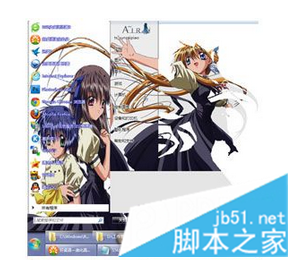
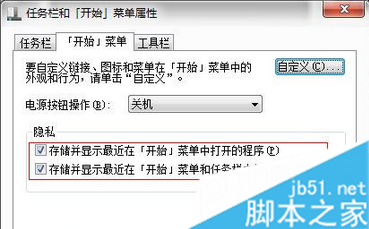
套用第三方主題後開始選單圖片與桌面錯亂變形,主因:開始選單會隨常用軟體記錄拉長,但主題製作者通常已停用「工作列儲存記錄」,使用者端未停用導致拉伸變形。
取消勾選圖中指定的兩個「儲存」選項並確定,即可正常顯示主題效果(但將失去開始選單常用軟體顯示功能)。
Windows 10 升級免費嗎?內測用戶可免費獲取正式版
Win8.1 一鍵切換使用者身分執行程式 (Shift+右鍵 以其他使用者身分執行)
Win7 如何設定螢幕鎖定與自動鎖定?快捷鍵、螢幕保護程式、電源選項完整教學
Windows 10 攝影機/鏡頭無法開啟?驅動檢查與隱私權限雙管齊下解決教學
Win7 旗艦版虛擬記憶體優化設定:自訂大小 1.5 倍實體記憶體,提升遊戲效能
Windows 10 正式版前至少再推一個新預覽版:Insider 負責人確認多版本測試再凍結
Win8 如何在側邊欄顯示桌面小工具?開啟/拖曳/關閉小工具完整教學
XP 系統工作管理員被停用無法開啟?群組原則一鍵恢復