遇到控制台點擊無反應、無法開啟的情況,通常是病毒感染或群組原則誤將控制台停用所致。本文提供兩種對應解法。
執行完整掃毒清除惡意程式後,嘗試從「開始」→「控制台」或「電腦」側邊欄進入。
gpedit.msc 開啟本機群組原則編輯器。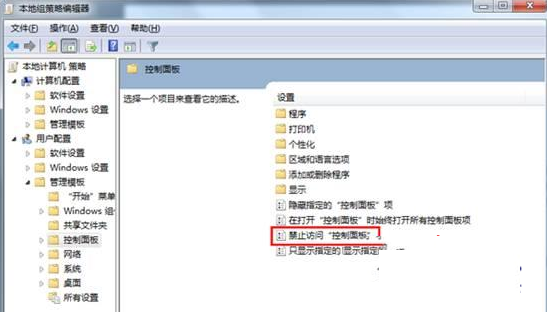
Windows 10 功能大禮包:Missed Features Installer 找回 Aero Glass、桌面小工具、經典遊戲等
騰訊電腦管家免費升級 Win10 完整圖文教學(含下載連結)
Windows 10 Continuum 模式介紹:二合一裝置的桌面/平板無縫切換體驗
Win10 善用 PowerShell 批量建立資料夾,效率倍增技巧
Win10 Mobile/PC Build 10586.550 曝光:TH2 版本最新累積更新,修復 Bug 與優化效能
Win7 開始選單「釘選到此清單」失效?360 人工服務一鍵修復