Windows XP Windows 7 Windows 2003 Windows Vista Windows 綜合教學 Linux 系統教學
Windows 10 Windows 8 Windows 2008 Windows NT Windows Server 電腦軟體教學
您现在的位置: Windows教程網 >> Windows教程 >  >> Windows 綜合教學 >> 關於 Windows

Win10 善用 PowerShell 批量建立資料夾,效率倍增技巧

編輯:關於 Windows

整理文件時需建立大量資料夾,逐一新增太費時。Windows 10 內建的 PowerShell 支援指令批量建立資料夾,幾秒鐘就能完成幾十、上百個資料夾的命名與建立。本文示範基本指令與參數調整,讓你輕鬆掌握這項實用技能。

操作步驟

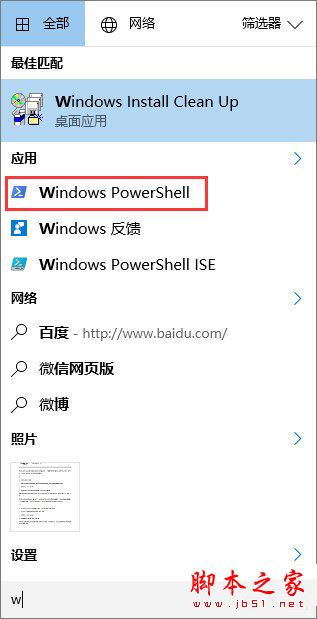
  1. 從「開始」功能表開啟 Windows PowerShell。
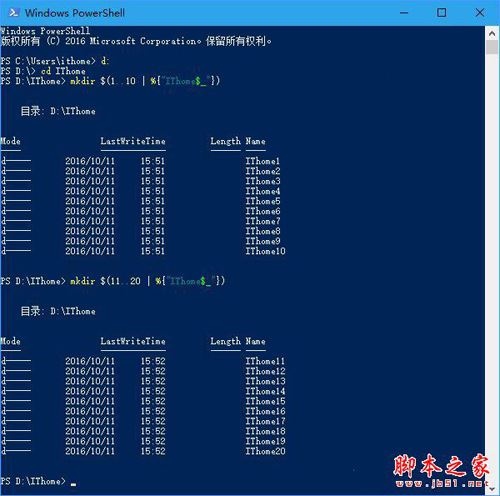
  2. 使用 cd 指令切換至目標目錄(或建立後再移動)。
  3. 輸入批量建立指令,例如:
    mkdir $(1..10 | %{"IThome$_"})
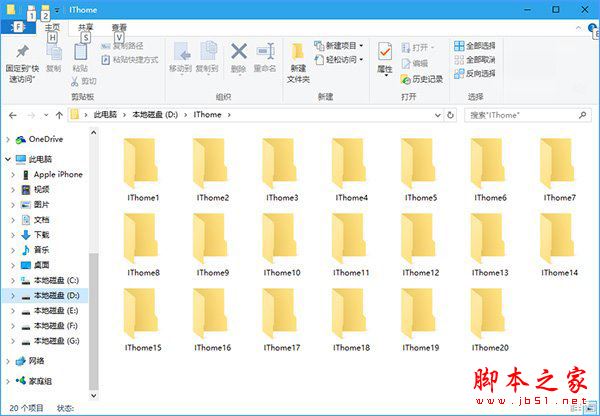
    即可建立 IThome1 至 IThome10 十個資料夾。

指令參數說明

  • 1..10:編號範圍,可自訂如 11..20、1..100。
  • {"IThome$_"}:資料夾前綴文字,$_ 代表編號,前綴可自訂。

提醒:複製指令時注意特殊字元編碼,若出現紅字錯誤,請將游標移至錯誤處修正後再執行。

Copyright © Windows教程網 All Rights Reserved