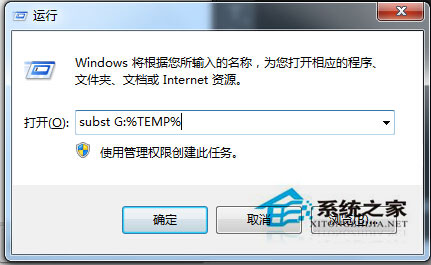
Win7 64位元安裝 CAD 提示錯誤 1327,主因安裝程式無法正確存取暫存目錄。解法:
subst G: %TEMP%
subst.exe 為 DOS 時代指令,功能是「將目錄掛載為虛擬磁碟機代號」。指令格式:subst [磁碟機代號:] [路徑]。此處將 %TEMP% 映射為 G:,讓安裝程式透過固定路徑存取暫存檔,繞過路徑解析錯誤。
subst.exe
subst [磁碟機代號:] [路徑]
%TEMP%
G:
同樣適用於其他安裝程式出現 1327 錯誤的情況。操作簡單、無風險、無需重開機。
Windows 8 調整單一應用程式音量:音量混合器使用教學
Win10 Build 10061 新增 Contact Support 服務,協助修復電腦問題
Windows 7 新增寬頻撥號連線 (PPPoE) 圖解教學:控制台 → 網際網路選項 → 連線
Win7 語言列不見了?控制台「語言列」索引標籤勾選停駐工作列
Win10 滑鼠右鍵無「解壓縮」選項?安裝解壓縮軟體即可恢復
Windows 8.1 開啟/關閉列印機服務 (Print Spooler) 完整圖文教學
Windows 7 音量忽大忽小解決方案:停用「通訊」活動偵測自動降音
Windows Server 新預覽版 2015 春季釋出,延長當前版本到期時間