Win10 內建「寫字板」編輯文件後,另存為純文字 (.txt) 方法:
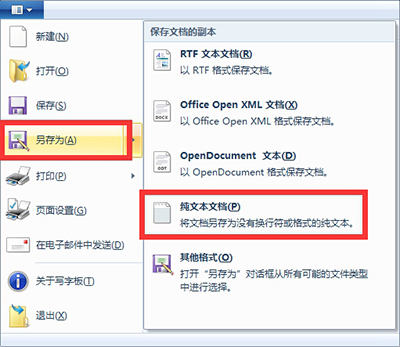
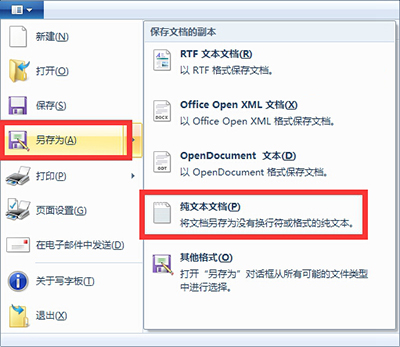
無需安裝 Office 即可輕鬆編輯、儲存純文字檔,適合簡易筆記、程式碼片段、設定檔修改等場景。
Win10 家庭版終於可關閉商店應用程式自動更新!KB3081448 更新後開關解鎖
Win10 Mobile 10586.107 怎麼更新?Lumia 950/XL/550 可升級
Windows 8 IE11 降級為 IE10 完整教學:控制台 → Windows Update → 解除安裝 IE11 更新項目
Win10 14367「將這台電腦設為可被發現」開關卡在關閉?透過本地安全性原則將網路位置改為私人網路
Win7 網路圖示黃色驚嘆號無法上網?八步驟排查法:重插網線/重開機/掃毒/網路診斷/DHCP Client/Netsh Winsock Reset
Win8.1 升級 Win10 出現錯誤代碼 0x80070005-0xA0019 的原因與兩大解決方案