Windows 10 版本繁多(家用版、專業版、企業版、教育版、專業工作站版、IoT 版等),免費升級時**版本必須對應**,否則升級後無法自動激活(數位授權綁定版本)。本文依微軟官方對應規則,整理 Win7/Win8/Win8.1 各 SKU 升級 Win10 版本完整對照表,助你下載正確 ISO、避免激活失敗。
⚠️ 核心原則:版本對應 = 激活成功
- 免費升級透過 **數位授權** 綁定硬體與**版本**。
- 升級前系統版本決定升級後版本,**不可跨版本**(家用版不能升專業版,專業版不能降家用版)。
- 系統架構(32-bit/64-bit)可自由選擇,**但 UEFI 開機機型必須與原架構一致**(32-bit UEFI 僅能裝 32-bit,64-bit UEFI 僅能裝 64-bit)。
Win7 升級 Win10 版本對照(較簡單)
| Win7 版本 | 升級至 Win10 版本 | 備註 |
|---|
| Starter / Home Basic / Home Premium | Win10 家用版 | 含 N/KN 版本 |
| Professional / Ultimate | Win10 專業版 | 旗艦版對應專業版,功能超集 |
| Enterprise (VL 批量授權) | ❌ 不符合免費升級 | 需透過 VLSC 部署 Win10 Enterprise |
Win8 / Win8.1 升級 Win10 版本對照(版本名稱易混淆,請仔細對照)
| Win8 / Win8.1 版本 | SKU / 關鍵字 | 升級至 Win10 版本 | 備註 |
|---|
| Windows 8 / 8.1 | Core(無後綴) | Win10 家用版 | 標準消費者版本 |
| Windows 8 / 8.1 with Bing | 含 Bing | Win10 家用版 | 低成本設備預裝 |
| Windows 8 / 8.1 中文版 | China / 中文版 | Win10 家用中文版 | **僅支援簡中語言,不可安裝其他語言包** |
| Windows 8 / 8.1 單語言版 | Single Language | Win10 家用單語言版 | **僅支援預裝語言,不可安裝其他語言包** |
| Windows 8 / 8.1 專業版 | Professional | Win10 專業版 | 含 N 版本 |
| Windows 8 / 8.1 專業版 + 媒體中心 | Professional with Media Center | Win10 專業版 | 媒體中心功能 Win10 已移除 |
| Windows 8 / 8.1 企業版 | Enterprise (VL) | ❌ 不符合免費升級 | VL 客戶自行部署 |
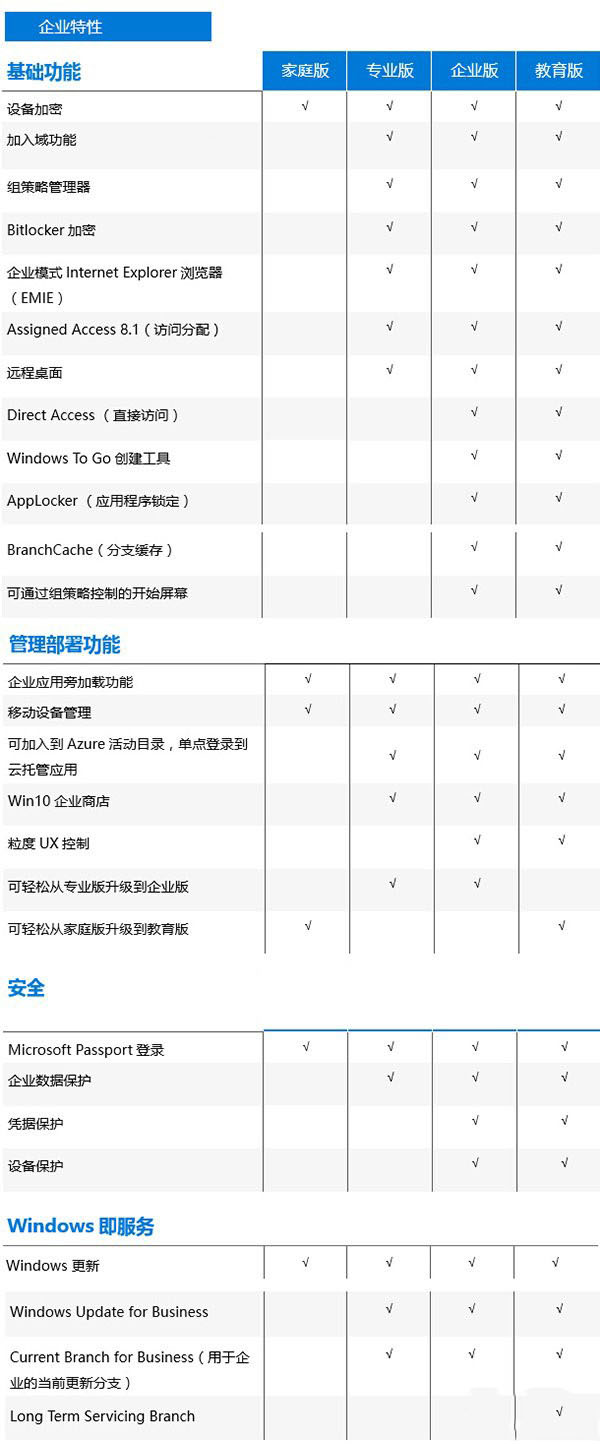
Win10 版本功能差異快速查核
| 功能 | 家用版 | 專業版 | 企業版 | 教育版 | LTSC |
|---|
| 群組原則 / BitLocker / 遠端桌面(主機) / 域加入 / Windows Update for Business | ❌ | ✅ | ✅ | ✅ | ✅ |
| Windows To Go / AppLocker / BranchCache / DirectAccess | ❌ | ❌ | ✅ | ✅ | ✅ |
| 無功能更新(僅安全更新)/ 無內建 UWP 應用 | ❌ | ❌ | ❌ | ❌ | ✅ |
| Cortana / Edge / Store / Xbox / 郵件 / 地圖 / 照片 | ✅ | ✅ | ✅ | ✅ | ❌ |
如何確認目前系統版本與 SKU
- Win+R >
winver:查看版本號(如 6.1.7601 = Win7 SP1)。
- 管理員命令提示字元:
wmic os get caption, OperatingSystemSKU:
SKU 代碼對照:
48=Professional, 72=Enterprise, 100=Core(家用版), 125=ProfessionalEducation 等。
- 控制台 > 系統 > 「Windows 版本資訊」區塊。
下載正確 ISO 的建議
- 使用 **Media Creation Tool** 選擇「為另一台電腦建立安裝媒體」,工具會自動偵測目前版本並下載對應 ISO(最保險)。
- 手動下載 ISO 時,檔名需包含對應版本關鍵字:
`ConsumerEdition` = 家用版/專業版雙版本映像(安裝時選擇)
`Enterprise` = 企業版
`Education` = 教育版
- 驗證 SHA1 雜湊值確保檔案完整。
對照表收藏備查,升級/重裝 Win10 不再踩版本錯誤雷,一次激活成功。