Win8 滑鼠右鍵磁碟 → 重新命名 無效時,可透過登錄表強制設定磁碟標籤。
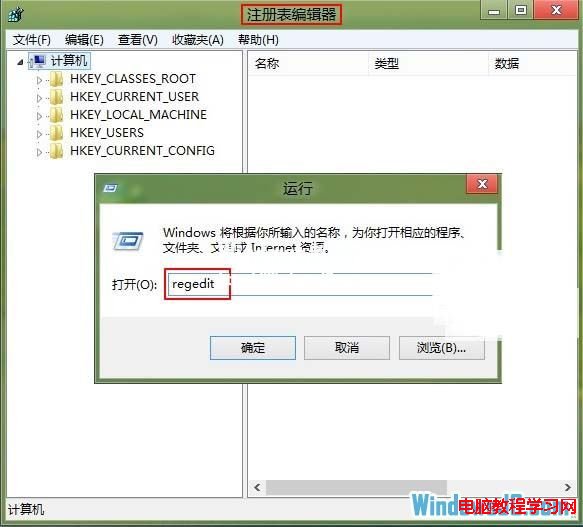
HKEY_LOCAL_MACHINE\SOFTWARE\Microsoft\Windows\CurrentVersion\Explorer\DriveIconsDriveIcons → 右鍵 新增 → 項目 命名 DriveIcons。DriveIcons 下新增項目命名為磁碟代號 (如 C)。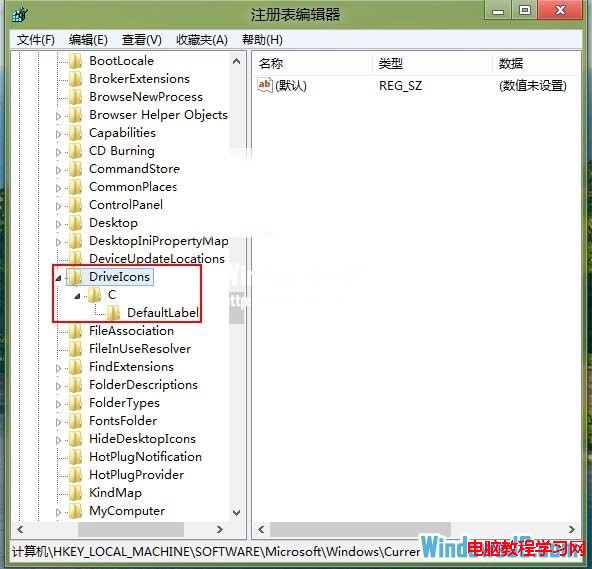
C 下新增項目命名 DefaultLabel。DefaultLabel,右側 預設 雙擊 → 數值資料 輸入想要的標籤 (如 Windows8) → 確定。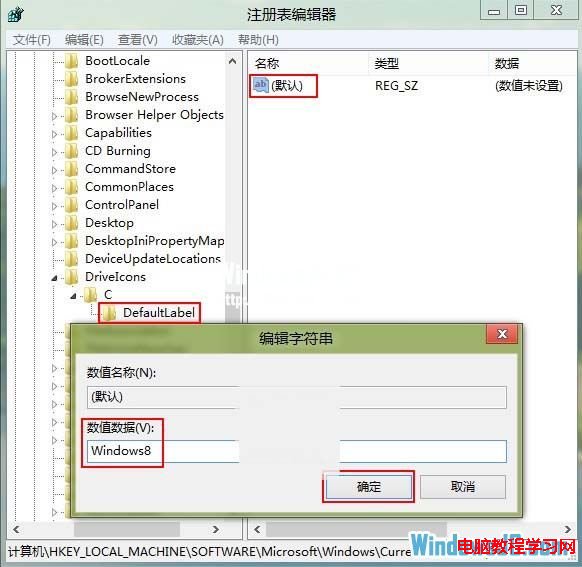
適用情況: 磁碟標籤含特殊字元導致無法重新命名、權限問題、或單純想用登錄表批次設定多台電腦磁碟標籤。Win7/10/11 同樣適用。若要恢復預設,刪除對應
DefaultLabel項目即可。
Win10 無法進入 BIOS?三種解決方案:重啟、關閉快速啟動、斷電重插
Win7 通知區域圖示不見了?「通知區域圖示」設定找回 + 重啟 explorer.exe 急救法
Win7 如何開啟路由器管理頁面?常見無法登入原因與五大解決方案
Windows 8/8.1 查看 DirectX 版本教學:dxdiag 指令一鍵查詢,Win10 將內建 DirectX 12
Windows PC 效能煥然一新十大技巧:找出資源佔用大戶、關閉托盤程式、停用啟動項、減少動畫、換輕量瀏覽器、掃毒、清理磁碟、碎片整理、移除不用軟體、重裝系統
Windows 7 正版驗證完整指南:線上驗證與本機指令雙管齊下
Win10 自動安裝遊戲、應用程式怎麼辦?修改登錄徹底關閉應用程式推廣功能
VMware Workstation 安裝 Windows 10 圖文教學:虛擬機建立、ISO 掛載、OOBE 設定全過程