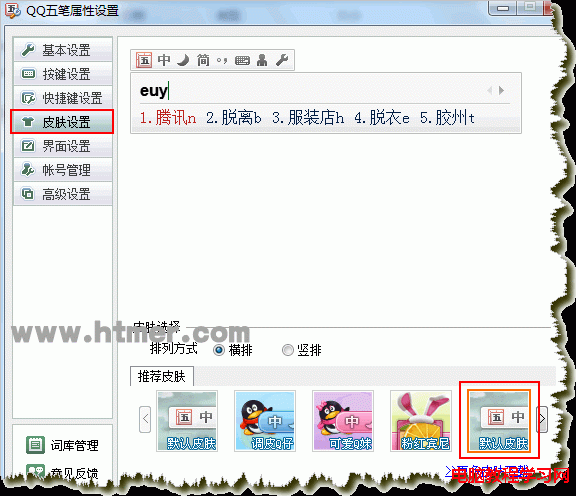
在 Windows 7 64 位元版安裝 QQ 五筆後,打字聯想欄背景變黑,32 位元版則正常。經摸索找到解決方法:重新設定 QQ 五筆皮膚即可。
Windows 8 Metro 介面自訂關機/重開機/登出磚教學
Win7 Word 開啟舊版文件提示「版本過低」?另存為 Word 97-2003 格式解決相容性
Win10 Build 9880 最新版曝光,下載即將開放
Windows 7 工作管理員無法結束程序?命令列 tskill 強制終結進程教學
XP 瀏覽淘寶無法顯示圖片?清理快取 BAT 腳本 + IE 設定勾選顯示圖片雙重解決
Win7 開始功能表空白?調整「最近開啟程式數目」非零即可恢復
繼續使用過期 Win10 預覽版 (10240 前版本) 後果嚴重:每 3 小時強制重開機,兩週後拒絕開機
Windows 10 Mobile 10512 大規模更新:超過 2000 項修復進入 TH2 新分支