升級 Windows 10 後點擊 Edge 等內建應用提示「無法開啟此應用程式」,主因是關閉了 UAC(使用者帳戶控制)。重新啟用 UAC 即可解決。


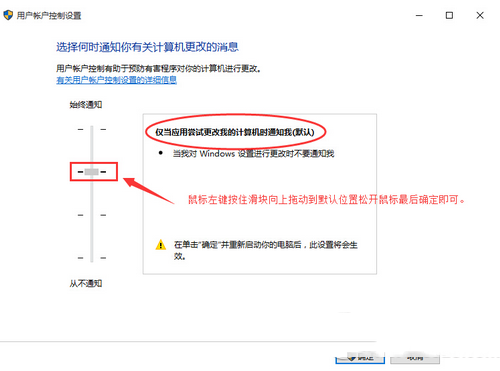

關閉 UAC 會導致內建現代應用無法執行,保持啟用為預設安全設定。
Windows 1.0~3.0 早期版本演進史:從 DOS 圖形擴充到桌面霸主的奠基之路
Windows 8.1 安裝 NVIDIA 顯卡驅動失敗?徹底清理殘留並啟用關鍵服務解決
聯想 Win8/8.1 預裝機改裝 Win7:BIOS 設定與 MBR 分區完整教學
Windows 10 累積更新 KB3081424 安裝失敗 (0x80070003)?嘗試安裝 KB3081440 相容性更新可望修復
Win10 Build 10158 上手操作影片首發:Edge、Cortana、Photos、Surface 優化詳解
Windows 10 群組原則編輯器啟動跳出「命名空間已定義」彈窗?刪除 Geolocation ADMX 檔案即可解決