Windows 10 預設不在「所有應用程式」顯示 Internet Explorer 11,但系統仍完整保留。只需透過 Cortana/搜尋框輸入「Internet Explorer」即可找到,並可釘選至開始選單磚塊或工作列圖示,方便日後快速啟動。
快速找到並釘選 IE 11
- 在工作列搜尋框 / Cortana 輸入「Internet Explorer」 (或語音說「嘿小娜,開啟 Internet Explorer」)。
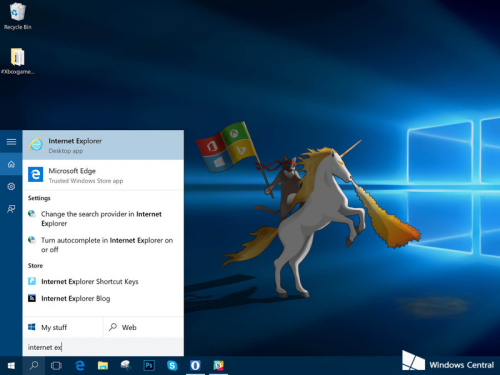
- 搜尋結果右鍵點選「Internet Explorer」。
- 選擇「釘選到開始畫面」→ 開始選單磚塊區將出現 IE 圖示。
- 或選擇「釘選到工作列」→ 工作列直接顯示 IE 圖示,單擊即開。
補充說明
- IE 11 為相容性保留,支援 ActiveX、企業內部舊版 Web 應用。
- Edge 為預設瀏覽器,日常上網建議使用 Edge (Chromium 版) 或 Chrome/Firefox。
- 企業環境可透過群組原則設定「企業模式網站清單」,指定網址自動用 IE 開啟。
三步驟找回 IE 11,舊版網銀、政府網站不再愁。