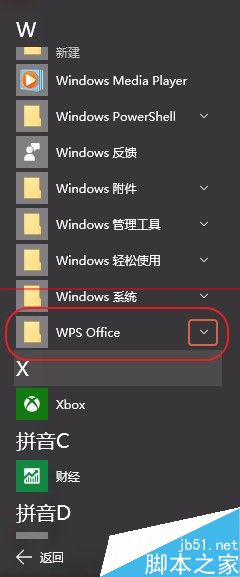
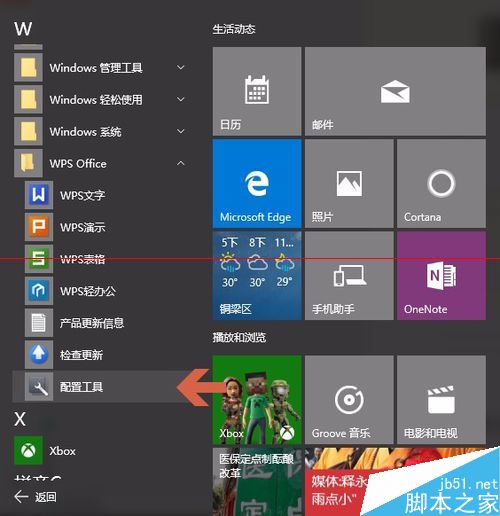
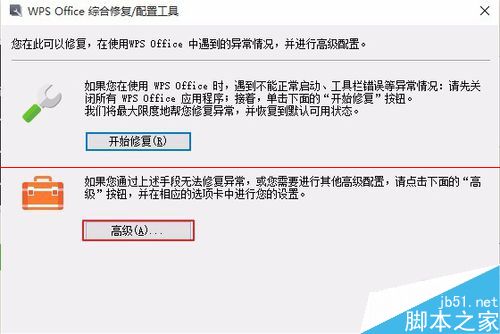
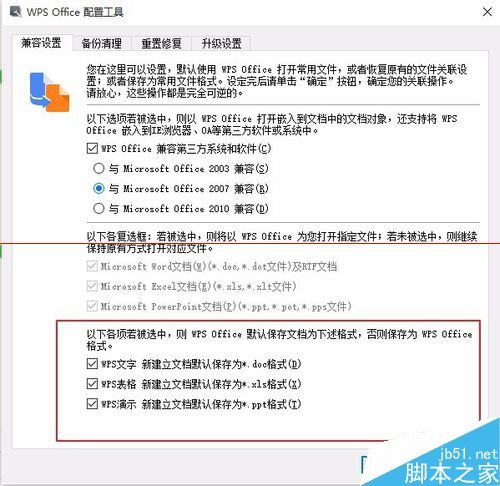
辦公軟體首選 WPS,功能強大支援雲儲存。設定為預設開啟工具:
Windows 7 旗艦版修復硬碟分區圖示異常:兩種解決方法(autorun.inf / 磁碟管理)
Win10 系統內建加密資料夾兩大法:右鍵選單加密與 EFS 進階屬性加密
Windows 7 查看本機 IP 位址、MAC 位址、閘道、DNS 完整步驟
Win10 Cortana 语音助手早期体验截图曝光:需麦克风/位置权限、UI 简陋、频繁崩溃、功能远不及 WP 版
Windows 8 開關機與關閉應用程式:Metro 介面操作指南
Win10 正式版如何進入安全模式?兩種簡單快捷鍵方法圖解
Windows 8 Start Screen Editor 自訂 Metro 開始畫面背景與色彩
Windows 7 磁碟分割教學:壓縮現有分割區建立新磁碟區 (圖文詳解)