Windows XP Windows 7 Windows 2003 Windows Vista Windows 綜合教學 Linux 系統教學
Windows 10 Windows 8 Windows 2008 Windows NT Windows Server 電腦軟體教學
您现在的位置: Windows教程網 >> Windows教程 >  >> Windows 綜合教學 >> 關於 Windows

Win 10「郵件與行事曆」同步錯誤 0x80c8043e 解決方法:PowerShell 重新註冊或解除安裝 KB3081436

編輯:關於 Windows

Win 10「郵件與行事曆」同步出現錯誤 0x80c8043e,提供官方 PowerShell 方案與用戶自發的移除 KB3081436 方案。

方法一:PowerShell 重新註冊(官方)

  1. Cortana 搜尋「PowerShell」→ 右鍵「以系統管理員身分執行」。
  2. 執行指令:
    Get-appxprovisionedpackage -online | where-object {$_.packagename -like "*windowscommunicationsapps*"} | remove-appxprovisionedpackage -online
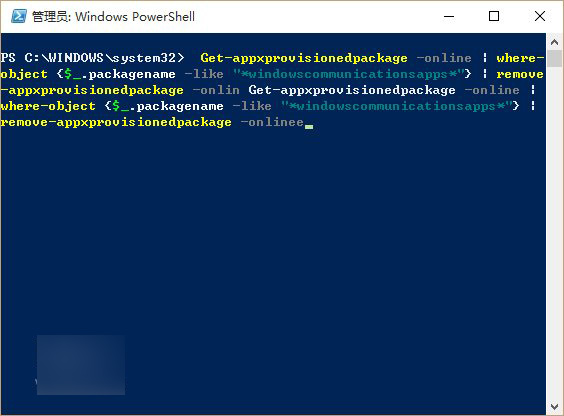
  3. 完成後在應用程式商店重新下載安裝「郵件與行事曆」。

PowerShell 指令

方法二:解除安裝 KB3081436(用戶自發)

KB3081436 為 Win 10 正式版第二枚累積更新,安裝後導致同步錯誤。解除安裝路徑:設定→更新與安全性→進階選項→檢視更新歷程記錄→解除安裝更新→找到 KB3081436 雙擊移除。
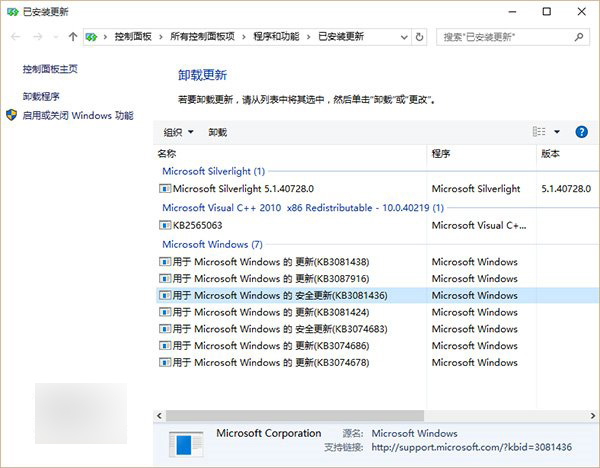
解除安裝更新

注意:安全更新能不移除盡量不移除,若已安裝第三枚累積更新 KB3081438 仍建議優先嘗試方法一。若第三枚更新安裝失敗,避免使用方法二。

許多用戶回報方法二有效,遇到同樣問題可嘗試。

Copyright © Windows教程網 All Rights Reserved