Win10 預設 Shift+右鍵無「以其他使用者身分執行」,需透過群組原則啟用。
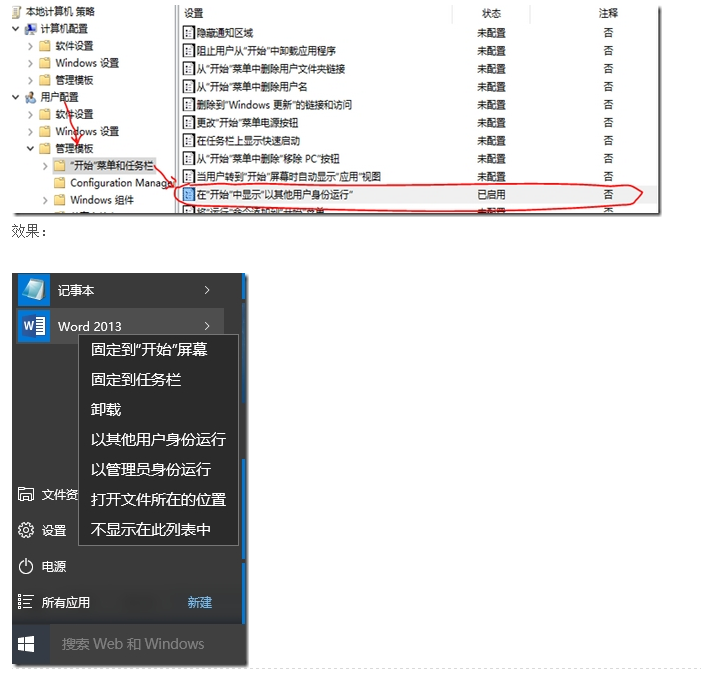
設定路徑:群組原則編輯器 → 使用者設定 → 系統管理範本 → 開始功能表與工作列 → 「在開始功能表顯示『以其他使用者身分執行』命令」 → 啟用。
此為全域設定,啟用後所有使用者皆可在開始功能表使用該功能。
Win10 動作中心快速動作按鈕自訂:新增/移除/排序全攻略
Win7 關閉自動更新完整圖文教學:透過控制台與群組原則徹底停用
Win10 10565预览版:默认打印机自动切换为最近使用,支持手动固定
硬碟安裝 Windows 10 系統完整教學(使用軟媒魔方硬盤裝機)
Windows 7 安裝 Flash 提示憑證驗證失敗 移除不受信任發行者
停用 Windows Media Player 自動複製音樂 CD 功能
Win10 桌面捷徑不見了?手動建立常用工具捷徑完整教學(數學輸入面板、繪圖、印象筆記、驅動精靈、截圖工具、滑動關機、一鍵結束程式、IE暫存資料夾)
Win10 累積更新 KB3140745 反覆安裝失敗?清除 SoftwareDistribution 快取或重命名資料夾強制重下載