Windows XP Windows 7 Windows 2003 Windows Vista Windows 綜合教學 Linux 系統教學
Windows 10 Windows 8 Windows 2008 Windows NT Windows Server 電腦軟體教學
您现在的位置: Windows教程網 >> Windows教程 >  >> Windows 綜合教學 >> 關於 Windows

Win10 Edge 瀏覽器收藏夾路徑在哪裡?快速開啟與備份還原教學

編輯:關於 Windows

Microsoft Edge 將收藏夾儲存為檔案系統中的捷徑檔案,路徑位於 %LocalAppData%\Packages\Microsoft.MicrosoftEdge_8wekyb3d8bbwe\AC\MicrosoftEdge\User\Default\Favorites。可直接開啟此路徑備份或還原收藏夾。
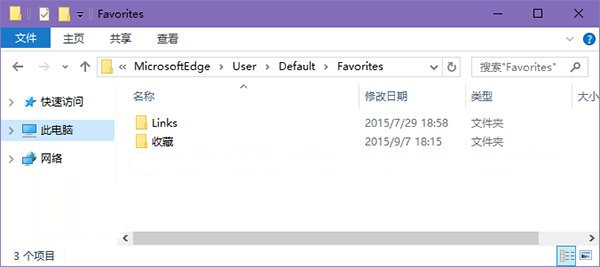
開啟收藏夾資料夾

  1. 按 Win+R 開啟「執行」,或在檔案總管網址列直接貼上以下路徑按 Enter:
    %LocalAppData%\Packages\Microsoft.MicrosoftEdge_8wekyb3d8bbwe\AC\MicrosoftEdge\User\Default\Favorites
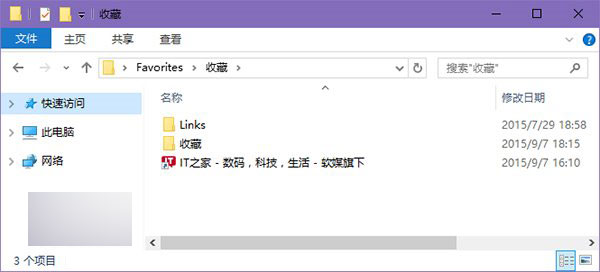
  2. 即可看到所有收藏夾捷徑(.url 檔案)與資料夾結構。
    Edge收藏夾路徑

備份方法

直接複製整個 Favorites 資料夾到其他位置(如 OneDrive、外接硬碟)。

還原方法

  1. 重裝系統後,直接複製備份內容回原路徑有時不生效。
  2. 建議改用「從 IE 匯入」:將備份的收藏夾複製到 %UserProfile%\Favorites(IE 收藏夾路徑)。
    複製到IE收藏夾
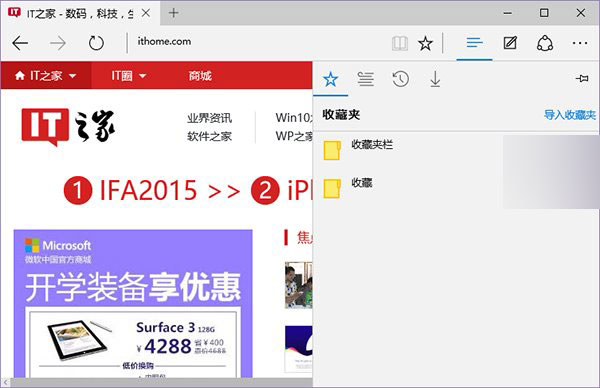
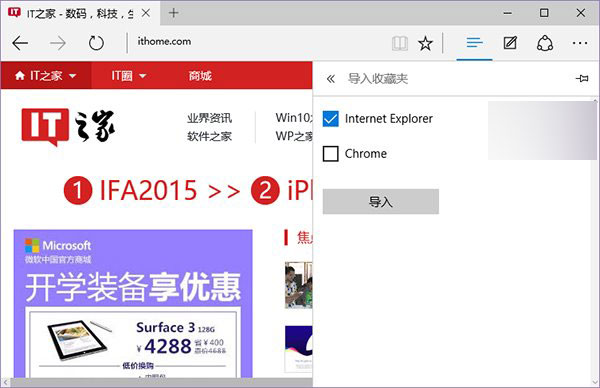
  3. 開啟 Edge → 右上角「...」→ 「設定」→ 「匯入收藏夾」→ 選擇「Internet Explorer」→ 匯入。
    Edge匯入設定
    選擇IE匯入

此法可確保收藏夾結構完整還原至 Edge。

Copyright © Windows教程網 All Rights Reserved