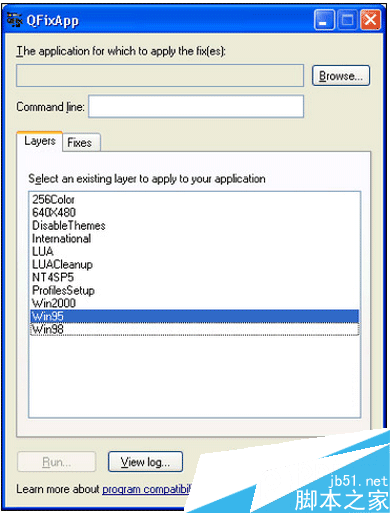
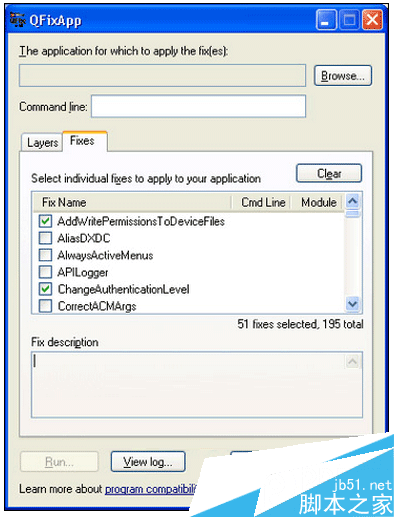
Windows XP 系統程式易損壞,微軟提供 Qfixapp.exe 快速修補工具。可從 %SystemRoot%\windows\apppatch\sysmain.sdb 讀取修補資料庫,套用至指定程式測試有效性。
%SystemRoot%\windows\apppatch\sysmain.sdb
工具介面選項:
Win95
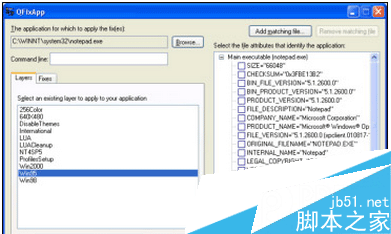
操作範例 (以記事本為例):
notepad.exe
.sdb
Qfixapp.exe 為技術人員簡易好用的相容性修補工具,隨軟硬體更新迭代作用漸小。
Win7 Aero 玻璃半透明效果消失修復:個人化啟用透明效果或疑難排解
Win7 關閉移動裝置自動播放:群組原則與登錄檔雙法防隱私洩露
什麼時候能買到預裝 Windows 10 的 PC?
安裝 Win8 雙系統提示「無法存取」磁碟?取得磁碟擁有權與完整控制權限
Win7 任務列圖示置中顯示技巧:新增工具列+拖曳定位法
Win10 週年更新「動作中心」大改版:優先順序、快速動作 15 格、跨裝置同步全解析
Win7 關閉系統保護釋放磁碟空間:完整圖文教學與刪除還原點技巧
微軟再推 KB2952664 更新 Win7 助升級 Win10 不想升級請隱藏或移除