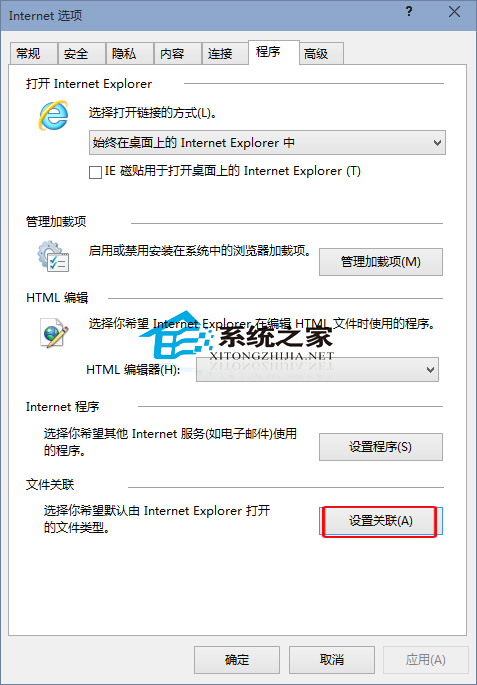
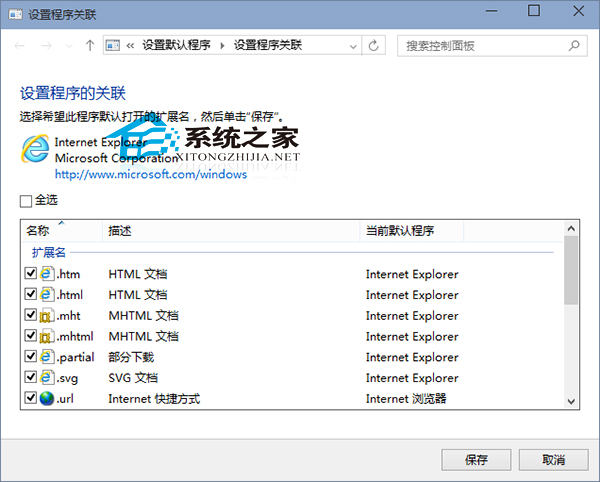
Windows 10 安裝其他瀏覽器後可能導致 IE 無法開啟 HTML 等網頁檔案,需重新設定 IE 檔案關聯。
補充: 若習慣從開始選單磚貼啟動 IE,但偏好桌面版 IE,可在同頁設定「開啟 Internet Explorer 時」選「一律在桌面版 Internet Explorer 開啟」。
Win10 退出家庭群組完整教學:關閉非必要服務釋放資源
Windows 設定密碼錯誤鎖定門檻:防止暴力猜測的本地安全性原則設定
Win10 安裝 NVIDIA 顯卡驅動提示「GeForce Experience 遇到錯誤必須關閉」?防火牆阻擋,加入允許清單解決
Windows 8 IE10 無法播放 Flash 解決方案:檢查附加元件與 ActiveX 篩選
Win 10 系統「啟動和故障修復」如何開啟?三種進入方式
Windows 10 開啟 iTunes 提示「Bonjour 服務已停用」解決方法
Win10 通用應用「通知視覺化」發布:開發者設計自適應動態磚貼神器
免費升級 Windows 10 後能降級回 Win7/Win8.1 嗎?個人用戶擁有 1 個月決定權,企業用戶具備彈性降級服務