Win7 控制面板「操作中心」無法打開/顯示空白,通常因 Security Center 服務被禁用/停止。啟用該服務並設為自動啟動即可恢復。
services.msc 回車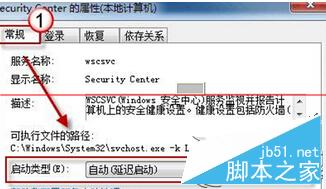
Security Center 依賴:
若啟動失敗,檢查上述依賴服務狀態,並查看事件查看器 → System 日志中 Service Control Manager 錯誤詳情。
| 監控項目 | 異常時提示 |
|---|---|
| 防火牆狀態 | 關閉 → 紅盾警告 |
| 防病毒軟件 | 未安裝/過期/關閉 → 紅盾 |
| 自動更新 | 關閉/錯誤 → 黃盾 |
| Internet 安全設置 | 安全級別過低 → 提示 |
| 用戶賬戶控制 (UAC) | 關閉 → 提示 |
| 網絡訪問保護 (NAP) | 企業環境相關 |
| 備份狀態 | 未配置/失敗 → 提醒 |
| 故障排除/維護 | 磁盤錯誤/碎片等 |
Win10/11 以「Windows 安全中心」 (Windows Security) 替代,入口:設置 → 隱私和安全性 → Windows 安全中心,架構全面重寫,不再依賴單一 Security Center 服務。
Win7 硬碟安裝 Linux 雙系統後移除 Linux 恢復 Win7 開機:破壞 GRUB + 修復 MBR 完整教學
Win10 預覽版 14251 更新內容與已知問題完整匯總:修復遊戲閃退、DPI 崩潰,但 Edge F12 工具仍無法載入
Windows 7 六大傷硬碟壽命的系統服務 關閉它們延長硬碟壽命
警告:Windows 更新 KB3013769 導致卡巴斯基用戶藍屏死機 (SYSTEM_THREAD_EXCEPTION_NOT_HANDLED kl1.sys),請立即卸載
Win10 升级后蓝屏/无限重启?进安全模式禁用独显或卸载显卡驱动解决
Windows 7 內建虛擬無線網路:10 分鐘將筆電變身無線分享器
WinXP 如何取消開機磁碟掃描?註冊表刪除 BootExecute 數值資料 Autocheck autocheck * 永久禁用