Windows XP Windows 7 Windows 2003 Windows Vista Windows 綜合教學 Linux 系統教學
Windows 10 Windows 8 Windows 2008 Windows NT Windows Server 電腦軟體教學
您现在的位置: Windows教程網 >> Windows教程 >  >> Windows 綜合教學 >> 關於 Windows

WinXP 如何取消開機磁碟掃描?註冊表刪除 BootExecute 數值資料 Autocheck autocheck * 永久禁用

編輯:關於 Windows

WinXP 非正常關機會觸發開機磁碟掃描(Autochk),耗時極長。註冊表刪除 BootExecute 數值資料可永久禁用,附備份還原教學。

操作步驟(含備份)

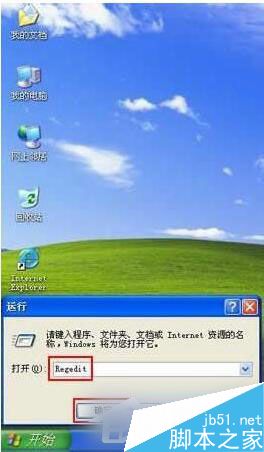
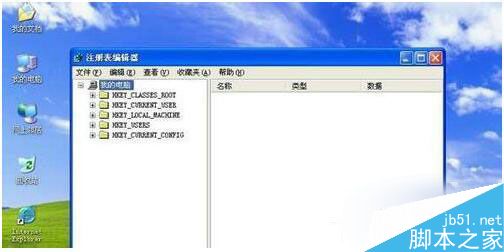
  1. Win+R 輸入 Regedit 開啟註冊表編輯器。
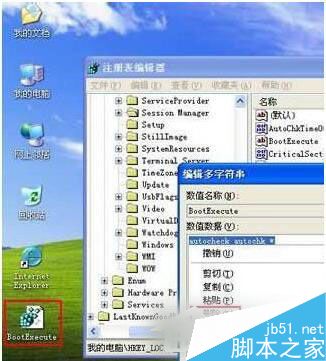
  2. 定位 HKEY_LOCAL_MACHINE\SYSTEM\CurrentControlSet\Control\Session Manager 找 BootExecute。
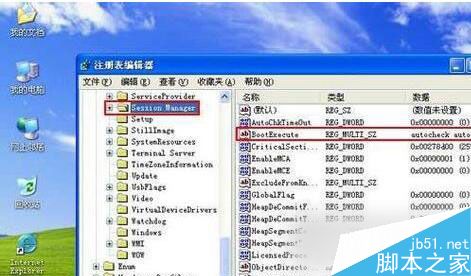
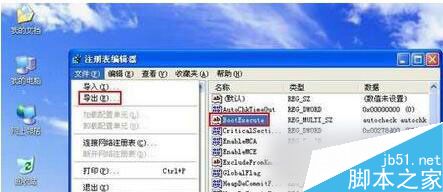
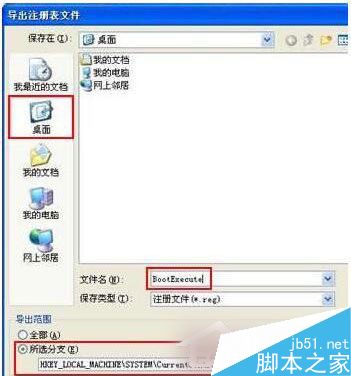
  3. 先備份:「檔案」→「匯出」→ 儲存桌面命名 BootExecute.reg,含路徑資訊可還原。
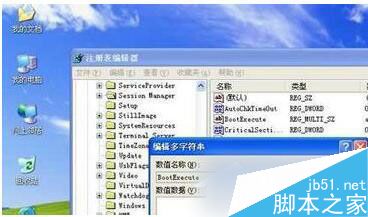
  4. 雙擊 BootExecute → 刪除數值資料 Autocheck autocheck * → 確定。
  5. 關閉註冊表,重開機不再掃描磁碟。

警示:涉及註冊表修改,請嚴格按教學操作並備份,切勿誤刪其他鍵值。磁碟掃描可發現錯誤,禁用後建議定期手動執行 chkdsk 維護磁碟健康。

Copyright © Windows教程網 All Rights Reserved