Windows 7/8 升級 Windows 10 常遇錯誤代碼,本文提供六大經典錯誤完整修復步驟:
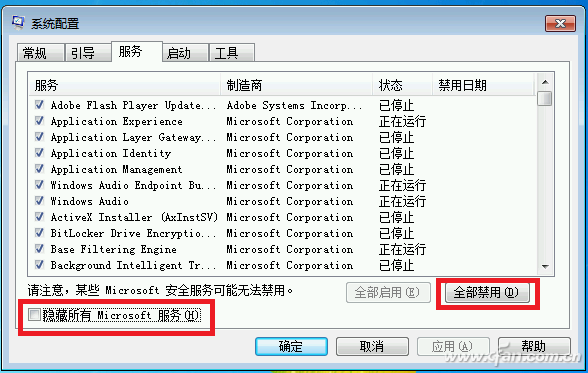
主因:第三方安全軟體服務干擾。解法:Win+R → msconfig → 「啟動」禁用所有第三方項目 → 「服務」勾選「隱藏所有 Microsoft 服務」 → 禁用其餘服務 → 重試升級。
現有系統無法透過 Windows Update 升級。解法:至微軟官網下載 Windows 10 ISO 鏡像離線升級。
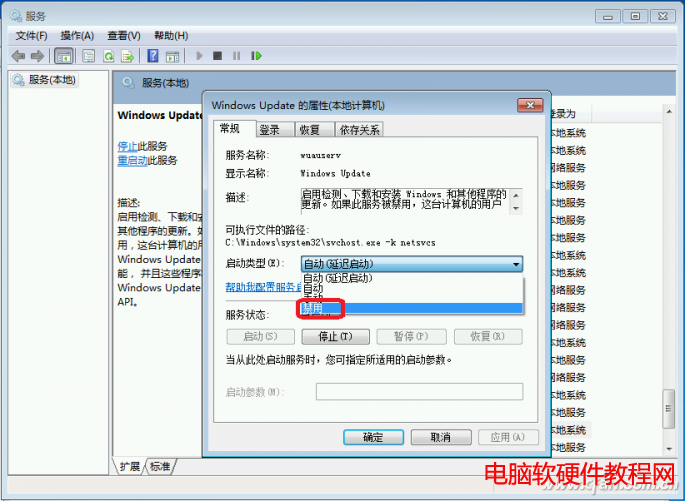
伺服器/網路導致升級檔損毀。解法:服務中停止「Windows Update」 → 清空 C:\Windows\SoftwareDistribution\DataStore 與 Download 資料夾 (含隱藏檔) → 重啟服務重新下載。
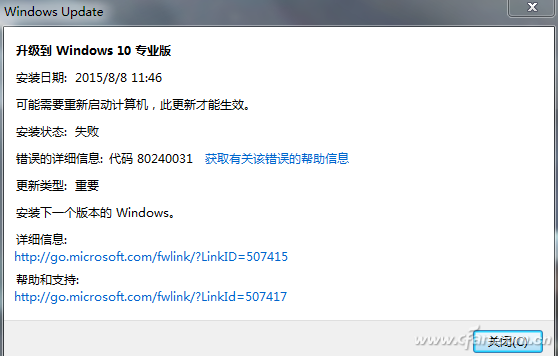
同上清理 SoftwareDistribution 後,以管理員身分執行 wuauclt.exe /updatenow 強制檢查更新。
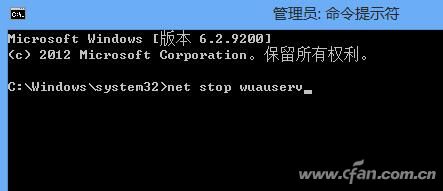
管理員命令提示字元依序執行:net stop wuauserv → 將 SoftwareDistribution 重命名為 SoftwareDistributionOld → net start wuauserv → 重開機。
BITS 服務設定問題。解法:services.msc 啟用「Background Intelligent Transfer Services」、「Windows Installer」、「Cryptographic Services」、「Software Licensing Service」、「Windows Update」五項服務。
升級遇到其他錯誤歡迎留言討論,持續更新解決方案。