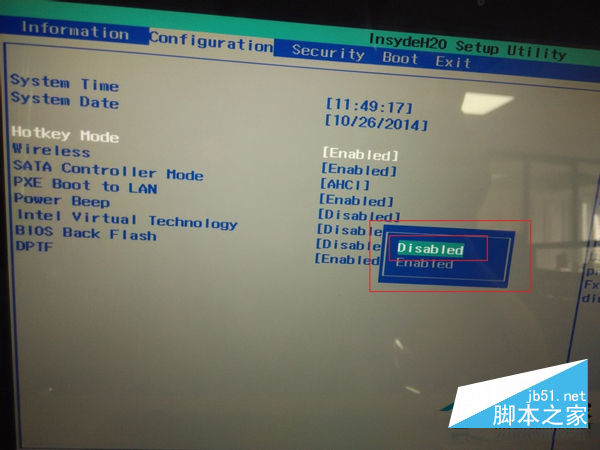
Win8 筆電預設 Fn 鍵啟用熱鍵模式(F1-F12 需搭配 Fn),若習慣直接使用功能鍵,可進 BIOS 關閉。
注意: 關閉後 F1-F12 固定為功能鍵,熱鍵功能需改用 Fn+F1-F12 呼叫。
Win8.1 網速變慢原因與解決:關閉應用自動更新、釋放系統保留頻寬
Windows 8.1 無法安裝最新版微軟必應輸入法?命令列靜默安裝破解限制
XP 升級 Windows 8 圖文完整教學
升級 Win8.1 點擊 Setup.exe 提示「不支援此升級路徑」解決方法
Win10 Build 10125 圖標大改版:扁平化風格回歸經典,文件夾/驅動器/外設全換新裝
Windows XP/7/8 顯示副檔名:資料夾選項/檢視索引標籤一鍵開啟
Win8 TMP 暫存檔完整認識:來源、用途、開啟工具、安全刪除時機
Windows 8 IE10 啟用快速導航(Quick Tabs)功能