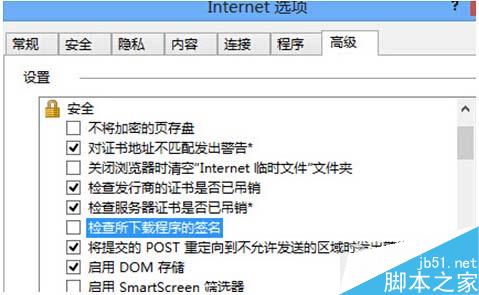
完成後重新下載程式,即不再彈出「簽章無效」阻擋安裝。此設定僅影響 IE 下載行為,其他瀏覽器不受影響。注意:關閉此選項會降低安全防護,建議僅在信任來源下臨時關閉,事後恢復勾選。
Win7 連接手機 USB 自動彈出播放?註冊表禁用 USBSTOR 服務徹底解決
Win8 停用運行中服務釋放記憶體:Ctrl+Shift+Esc 開啟工作管理器→服務分頁→右鍵運行中服務→停止
使用 Windows 8 內建虛擬光碟機掛載 ISO 映像檔:免安裝第三方工具
Win10 輸入法切換反人類?註冊表深度自訂打造完美「單鍵盤布局+多輸入法」體驗 (附註冊表備份/還原/一鍵導入)
Win10 UWP 版微信 1.1 正式版更新:群聊 @ 功能、消息轉發、草稿保留、關閉不登出
Windows Server 2008 IIS 7 驗證碼無法顯示?啟用 ASP「啟用父路徑」即可解決