什麼是 Appcrash?
Appcrash 是 Windows 7 與 Vista 系統特有的應用程式損毀錯誤,執行特定程式時會彈出「問題簽名」視窗,顯示錯誤模組名稱(如 xxx.dll)。
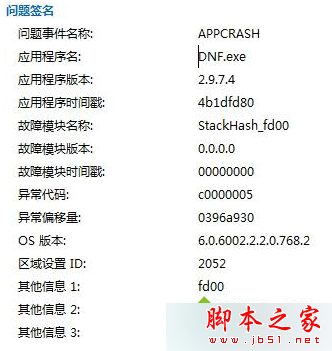
錯誤訊息通常會顯示「故障模組名稱」(如 XXXX.dll)。搜尋該 DLL 檔案屬於哪個程式,若非重要程式,直接解除安裝該程式即可排除衝突。
msconfig,在「啟動」索引標籤取消所有啟動項,僅保留輸入法 ctfmon。C:\Windows\Minidump 產生 .dmp 檔案(需管理員權限存取)。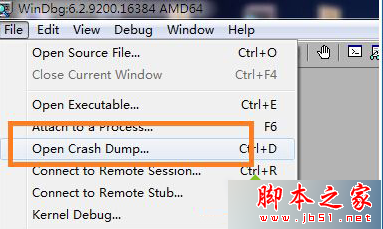
!analyze -v 進行詳細分析,找出真正導致崩潰的驅動程式或模組。備註: ! 為 WinDbg 擴充指令,analyze 為分析指令,-v 為詳細參數。
建議由簡單方法嘗試起,多數情況方法一或二即可解決 DNF Appcrash 問題。
修改 Windows 7/XP 開機選單名稱:BCDEdit 與 Boot.ini 完整指南
Win8 瀏覽器無法開啟二級網頁?關閉 IE 保護模式即可解決
Win10 系統下 QQ 2D 桌球無法啟動?教你用相容模式輕鬆解決
Windows 10 開啟 UAC (使用者帳戶控制) 三種方法:第三方工具、控制台、系統設定工具 (msconfig)
Win7 建立系統還原點教學:系統保護→建立→自訂描述快速建立還原基準
Win10 硬碟佔用 100% 導致卡頓?停用 HomeGroup Listener 與 IPv6 服務緩解