不想升級 Win10 的 Win7/Win8.1 使用者,可使用 GWX Control Panel 免安裝綠色小工具,完整控制升級提示:
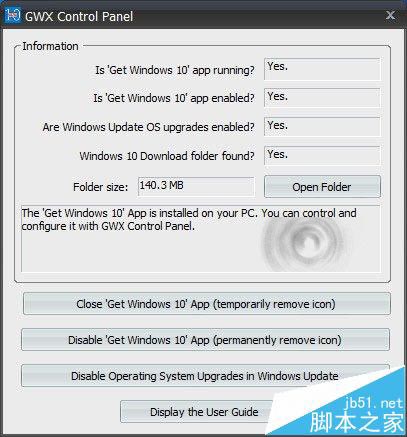
工具下載:百度網盤 (4.26MB,含數位簽章)。若僅需移除工作列圖示,亦可使用更簡單的「取得 Win10 移除工具」。
Win10 Mobile 10549 新功能上手體驗影片 (重複內容)
Windows Azure Linux 安裝 LNMP 遇到的問題與解決紀錄
Win10 無法登出 Microsoft 帳號?重置保留檔案可強制切回本機帳號
Win10 升級遇 0x80070006-0x2000c 錯誤?乾淨啟動法修復安裝失敗
Win10 週年更新 14316 新增忍者貓 Emoji 表情包(6 款),源自俄羅斯爆料人與微軟光頭哥互動
Win10 Build 10565 英文版 MySQL 環境變數配置指南(含注意事項)
MacBook Air安裝Windows 7圖文教學:Boot Camp下載驅動、分區20GB+、U盤備份驅動、Option鍵雙啟動
Windows 7 安裝卡在「正在啟動 Windows」:BIOS 關閉 ACPI 或替換 Winload.exe 修復