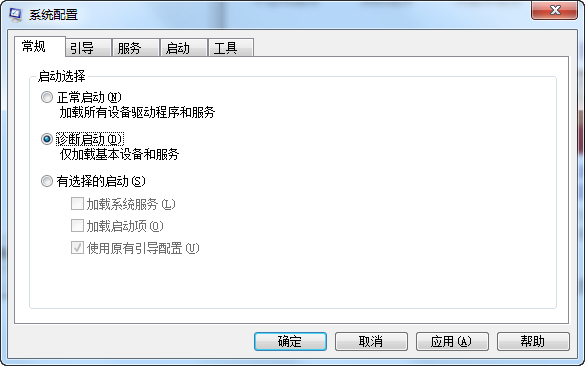
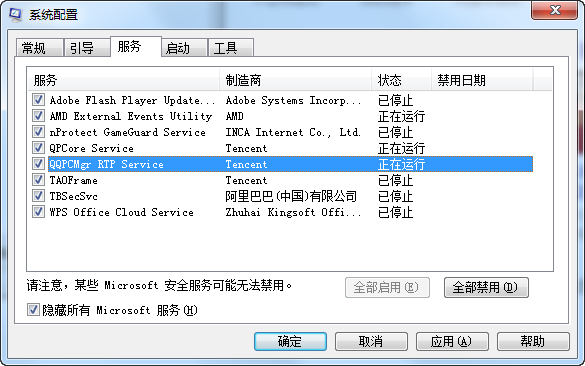
升級 Win10 時若跳出錯誤碼 0x80070006-0x2000c,通常因第三方服務或啟動項干擾。採用「診斷啟動」停用非微軟服務,可大幅提升升級成功率。
msconfig
建議下載官方 ISO 映像檔,採「全新安裝」方式部署,避開升級相容性地雷。
Win10 Wi-Fi Sense 真有安全隐患?密码加密存储微软云端,需用户授权才共享
史上最全 Win10/Win7/Win8.1 全部 ISO 系統鏡像下載
Win7 升級安裝 vs 全新安裝:差異詳細比較與選擇建議
Xbox One 遊戲串流至 Win 10:微軟全面開放最高畫質模式(1080p/60fps)
Windows 7 設定 IIS 伺服器完整圖文教學:控制台 → 程式和功能 → 開啟 Windows 功能
不想升級 Win10 如何關閉升級提醒?群組原則、登錄、關閉 GWX 通知三種官方方法
Win10 如何移除右鍵選單「釘選到開始畫面」選項?登錄表刪除 pintohome 鍵值
Win10 即將更新:Wi-Fi 設定將從 Charms 側邊欄改為獨立視窗介面,更符合傳統桌面操作習慣