原想安裝 Web 管理面板卻屢試失敗,最終改用 LNMP 一鍵安裝包,改用指令操作管理。
安裝教學請參考官網:https://lnmp.org/install.html
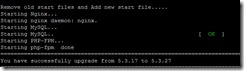
某些環境下預設 PHP 版本有問題,解決方法:退出安裝腳本,執行升級腳本將 PHP 升級至 5.3.27。
cd /root/lnmp1.0-full
./upgrade_php.sh
# 輸入 5.3.27 等待升級完成
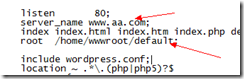
無論新增何域名,皆指向預設目錄 /home/wwwroot/default。解決:在 /usr/local/nginx/conf/vhost/ 下手動建立 域名.conf,內容參考 default.conf 修改 server_name 與 root 路徑,再重啟 Nginx。
# LNMP 整體
/root/lnmp {start|stop|reload|restart|kill|status}

# Nginx
/etc/init.d/nginx {start|stop|reload|restart}

# MySQL
/etc/init.d/mysql {start|stop|restart|reload|force-reload|status}

# PHP-FPM
/etc/init.d/php-fpm {start|stop|quit|restart|reload|logrotate}

# PureFTPd
/etc/init.d/pureftpd {start|stop|restart|kill|status}

# 範例:重啟 LNMP
/root/lnmp restart
# 單獨重啟 MySQL
/etc/init.d/mysql restart
後續遇到其他問題再補充記錄。
Win7 註冊表恢復誤刪回收筒圖示:HideDesktopIcons 鍵值歸零
微軟呼籲:請勿在 Win10 使用第三方「隱私保護」工具,恐破壞系統功能
Win7 安裝軟體時 IE 提示「禁止安裝無效簽章」?在網際網路選項允許安裝無效簽章軟體
Win10 新增語言包提示「連線到 Internet 檢查語言包」兩大解法
Win10 Mobile 10586.36 更新內容:修復已知問題、改進升級體驗、Insider 服務調整
Windows 7 遊戲無法全螢幕解決方案:修改登錄表 Scaling 參數或顯示卡控制面板設定縮放模式
Windows 10 Edge 瀏覽器支援 Open Search,Google 可設為預設搜尋引擎
Win10 TH2 多瀏覽器分頁無響應/卡死?三法修復:IE 啟用 ActiveX 篩選 / 禁用 Shockwave Flash Object / 完整重裝 Flash